In today’s fast-paced world, businesses need tools that let them create apps without deep coding skills. Powerapps stands out as a game-changer. This platform from Microsoft helps users build and deploy apps quickly. Whether you run a small team or a large company, powerapps makes it simple to turn ideas into working apps. It connects to data sources and automates tasks, saving time and effort.
Many people first hear about powerapps when they need mobile solutions for work or school. The app lets you access custom tools on the go, like tracking expenses or managing events. With its low-code approach, even non-tech experts can join in. This opens doors for citizen developers who want to solve problems without waiting for IT help.
What Is Powerapps?
Powerapps is a low-code platform that lets you create custom apps for business needs. It belongs to the Microsoft Power Platform, which includes tools for automation and data analysis. You can build apps that run on desktops, mobiles, or web browsers. The core idea is to make app development accessible to everyone, not just programmers.
Launched as part of Microsoft’s push into low-code tech, powerapps has grown since its start in 2016. It began as a way to build simple forms and has evolved into a full suite for enterprise apps. Today, it powers millions of apps worldwide, helping companies streamline operations.
For example, a sales team might use powerapps to track leads in real time. Or a school could create an app for event sign-ups. The platform pulls data from sources like Excel, SharePoint, or SQL databases. This flexibility makes it ideal for various industries.
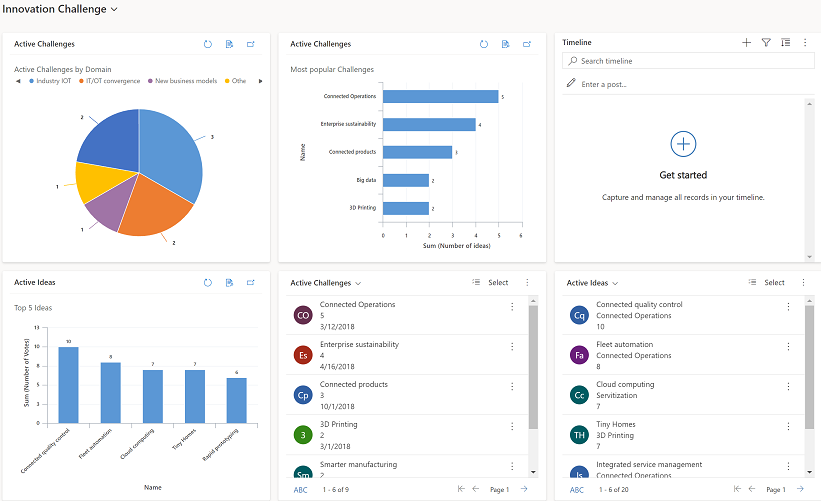
The Background and Evolution of Powerapps
Microsoft developed powerapps to address the gap between business needs and IT resources. In the past, creating apps required months of coding. Powerapps cuts that time by using drag-and-drop interfaces. It launched publicly in November 2016, building on Microsoft’s cloud services like Azure.
Over the years, powerapps has added AI features through Copilot. This lets users describe apps in natural language, and the system generates blueprints. Updates have included better mobile support and offline capabilities. By 2026, it’s integrated deeply with tools like Teams and Dynamics 365.
Achievements include helping companies save millions. For instance, one firm reduced app development time by 50%. Statistics show a 206% ROI over three years for premium users. These numbers come from Forrester studies, highlighting its impact on efficiency.
The platform’s growth ties to the rise of citizen development. Non-tech staff can now build apps, reducing shadow IT risks. Microsoft reports over 200,000 users at some clients creating apps monthly. This democratizes tech, letting ideas flow freely.
Key Features of Powerapps
Powerapps packs powerful features that make it stand out. Here, we break them down into simple lists for easy understanding.
- Drag-and-Drop Builder: Create interfaces without code. Add buttons, forms, and galleries easily.
- Data Connections: Link to over 1,000 sources, including Microsoft services and third-party APIs.
- AI Integration: Use Copilot to generate app ideas from text prompts.
- Offline Support: Some apps work without internet, syncing data later.
- Templates: Start with pre-built designs for common needs like surveys or trackers.
These features help users solve real problems. For example, connect to Dataverse for secure data storage. Or use formulas similar to Excel for logic.
Admins can pin featured apps for easy access. Swipe gestures let users favorite tools quickly. This user-friendly design boosts adoption.

Benefits of Using Powerapps for Businesses
Adopting powerapps brings clear advantages. It speeds up development, cutting costs and time. Companies report payback in under six months.
Boost Productivity: Automate routine tasks, freeing staff for important work. A healthcare provider saved 100,000 hours yearly by digitizing forms.
Enhance Mobility: The mobile app lets teams work anywhere. Download it from the Apple App Store or Google Play Store. Ratings average 4.7 stars, praising its ease.
Scale Securely: Enterprise governance ensures data safety. It reduces risks from unauthorized tools.
Foster Innovation: Citizen developers create solutions tailored to needs. This leads to faster problem-solving.
Examples abound. A bank deployed a lending app in 90 days, saving 117,000 hours annually. Another company saved $4 million with one app for customer interactions.
For small businesses, it levels the playing field. Start free and scale as you grow.
How to Get Started with Powerapps
Getting into powerapps is straightforward. Follow these steps to build your first app.
- Sign Up: Visit the Microsoft Power Apps site and create an account with your work email.
- Choose a Template: Pick from ready-made options like expense trackers.
- Connect Data: Link to sources like Excel or SharePoint.
- Design the App: Use the canvas to add elements. Drag controls and set properties.
- Add Logic: Write simple formulas for actions, like summing values.
- Test and Publish: Preview on mobile or web, then share with your team.
Tips: Start small. Use tutorials on the site. Join communities for advice.
Common pitfalls: Overcomplicating designs. Keep it simple for better usability.
Integrations That Enhance Powerapps
Powerapps shines with integrations. It works seamlessly with other Microsoft tools.
- Power Automate: Automate workflows, like sending approvals.
- Power BI: Add dashboards for data insights.
- Teams: Embed apps in chats for collaboration.
- Azure: For advanced custom code.
- SAP and Dynamics 365: Connect enterprise systems.
These links create end-to-end solutions. For instance, pull SAP data into a mobile app for field workers.
External tools integrate via connectors. This expands possibilities without extra coding.
Pricing and Plans for Powerapps
Powerapps offers flexible pricing.
- Free Developer Plan: Build and test apps at no cost.
- Basic: Included in some Microsoft 365 plans for limited use.
- Premium: $20 per user/month for unlimited apps and AI features.
Choose based on needs. Small teams start free; enterprises go premium for scale.
ROI is high, with quick returns on investment.
Powerapps on Mobile: Access Anywhere
The powerapps mobile app brings desktop power to phones. It supports apps like NFC scanning or mixed reality measurements.
Features include offline mode for remote work. Sync data when connected.
Users love its intuitiveness. One review calls it essential for budget tracking.
Download links: iOS or Android.
Real-World Examples and Case Studies
Powerapps delivers results across sectors.
In finance, HSBC built a lending tool fast, cutting costs by 50%.
T-Mobile uses it for customer service, saving $4 million.
Healthcare firms like VITAS digitize patient care, eliminating paper.
Accenture trains 50,000 developers, saving $6 million yearly.
These stories show powerapps tackles diverse challenges.
Tips for Optimizing Your Powerapps Experience
To get the most from powerapps:
- Use AI prompts for quick starts.
- Secure data with roles.
- Monitor usage with analytics.
- Update apps regularly.
- Train teams on basics.
Avoid common errors like ignoring mobile testing.
For more business insights, check BizReporterz.
FAQs About Powerapps
What is powerapps used for? It builds custom apps for business tasks like tracking or automation.
Is powerapps free? Yes, a developer plan is free; premium starts at $20/user/month.
Can I use powerapps offline? Certain apps support offline mode with data sync.
How does powerapps integrate with other tools? It connects to Microsoft services and more via connectors.
Who can benefit from powerapps? Businesses, developers, employees, and students needing custom solutions.
Conclusion
In summary, powerapps empowers users to create efficient apps with minimal code. Its features, integrations, and benefits make it a top choice for modern businesses. From saving time to boosting innovation, it transforms how teams work. Ready to build your own app? What problem will you solve first with powerapps?
References
- Apple App Store Page for Power Apps: Provides app description, features, and user reviews targeting mobile users in work or school settings.
- Google Play Store Page for Power Apps: Details mobile access, ratings, and examples for Android users focused on on-the-go productivity.
- Microsoft Official Power Apps Page: Offers in-depth info on features, pricing, case studies, and benefits for enterprise audiences seeking low-code solutions.
The audience includes business professionals, citizen developers, frontline workers, and students who value easy, mobile-friendly tools for custom app creation. They seek efficiency, cost savings, and integration with existing systems.