Introduction
When people compare 10/100Base T Vs 100Base T, they are usually trying to answer a practical question: should a network port that supports both 10 Mbps and 100 Mbps be treated differently from a port described as 100BASE-T? In everyday use, the answer depends on the hardware, the cable quality, the switch, and the speed your devices can actually negotiate. In standards terms, Fast Ethernet arrived as the 100 Mbit/s evolution of older 10 Mbit/s Ethernet, and the most common copper variant is 100BASE-TX. Fast Ethernet was standardized in the IEEE 802.3u era, and many ports can automatically negotiate with older 10BASE-T equipment when needed.

This topic matters because a simple-looking label on a port can hide a lot of real-world behavior. A device marked “10/100” may support older hardware more gracefully, while a 100BASE-T connection is about the 100 Mbit/s Fast Ethernet family over twisted pair. For home users, office networks, and small business setups, understanding the difference helps with troubleshooting, buying the right switch, and avoiding speed bottlenecks. The phrase 10/100Base T Vs 100Base T sounds technical, but the core idea is straightforward: one side is a dual-speed, backward-friendly port description, and the other is the 100 Mbit/s Ethernet family itself.
What the terms really mean
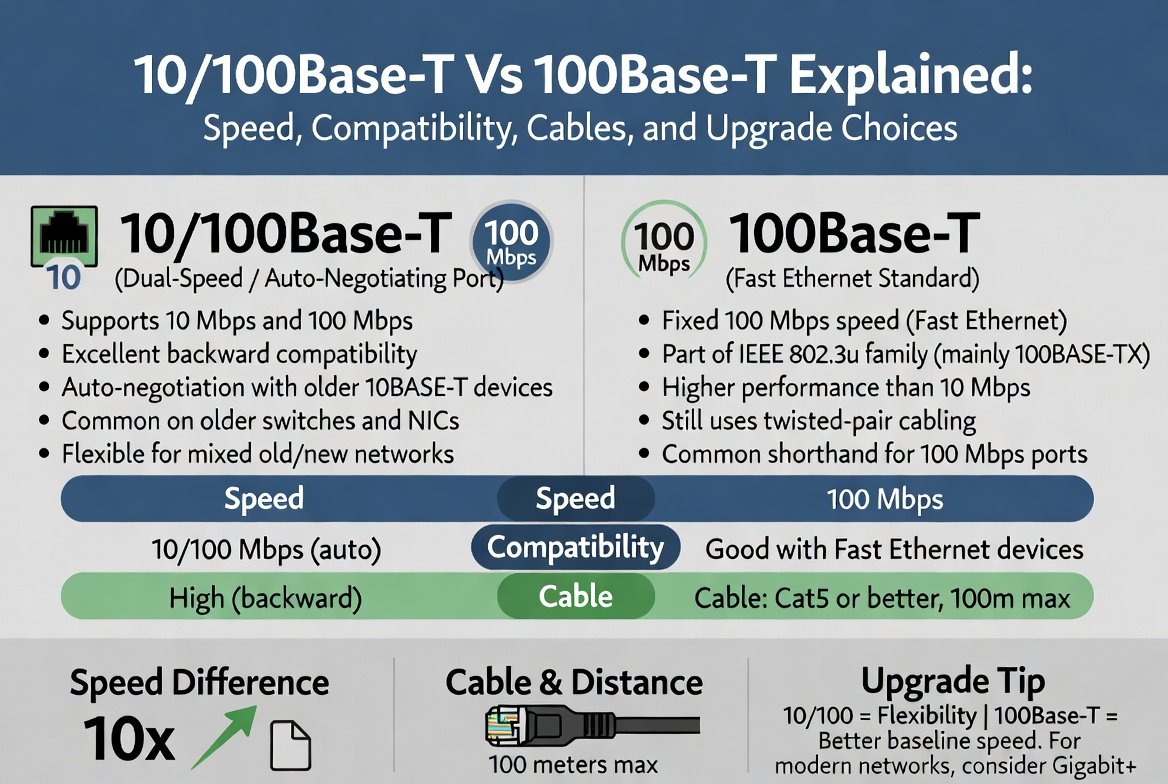
The easiest way to understand the topic is to split the naming into two layers. “10/100” describes a port or interface that can work at either 10 Mbit/s or 100 Mbit/s. “100BASE-T” refers to Fast Ethernet over twisted-pair cabling at 100 Mbit/s. In practice, the two often overlap because many network cards and switches were designed to support both speeds automatically. That is why you will often see older switches and NICs described as “10/100 Fast Ethernet” devices.
The “BASE” part means baseband signaling, and the “T” points to twisted-pair copper cable. On the copper side, 100BASE-T is commonly associated with 100BASE-TX, while the older 10BASE-T standard uses the same broad cabling family but at a much lower speed. The important practical point is that both are built around Ethernet over twisted pair, so a cable that works for one often works for the other as long as it meets the necessary quality and category requirements.
Speed is the biggest visible difference
Speed is the most obvious difference between these two ideas. 10 Mbit/s and 100 Mbit/s are not close in practical use, even though they look similar on paper. A 100 Mbit/s connection moves data roughly ten times faster than a 10 Mbit/s connection, which has a major impact on file transfers, software updates, cloud sync, printer sharing, and streaming inside a local network. Fast Ethernet’s 100 Mbit/s rate was a major leap over 10 Mbit/s Ethernet when it appeared.
That said, raw link speed is not the same thing as perfect real-world throughput. Ethernet traffic carries overhead, and actual usable throughput is lower than the labeled line speed. For example, Ethernet frame overhead means the effective data rate is always below the raw physical layer number. That is one reason a 100BASE-T link feels much faster than 10BASE-T, but still does not deliver a full “100 every second” to application data in exactly the same way a marketing label might suggest.
If you are choosing between an older 10/100 device and a more modern Ethernet port, speed alone usually points you toward the newer option. Even for basic home networking, 100 Mbit/s is enough for light browsing and simple file sharing, while 10 Mbit/s can feel restrictive very quickly once several devices are active or large files are involved. That is one reason many people now treat 10/100Base T Vs 100Base T as a legacy comparison rather than a current buying choice.
Backward compatibility makes 10/100 useful
Backward compatibility is the main reason 10/100 ports stayed popular for years. Fast Ethernet equipment commonly supports autonegotiation, which allows devices to detect what the other side can do and choose the best matching speed and duplex mode. If a switch port sees older 10BASE-T hardware, it can fall back appropriately so the link still comes up. That flexibility made upgrades much easier in mixed networks.
This matters in offices, labs, classrooms, and homes where not every device is replaced at the same time. A 10/100 port can keep older equipment alive while still giving newer devices a faster 100 Mbit/s path. In other words, the value of a 10/100 interface is not just speed; it is compatibility. If a network must support an old printer, a legacy camera, or an older embedded device, dual-speed support can save time and reduce frustration.
At the same time, compatibility should not be confused with performance. If one side of the connection negotiates down to 10 Mbit/s, the link will behave like a 10 Mbit/s link no matter how modern the other side is. That is why cable condition, connector quality, and device configuration still matter. A strong standard does not overcome a weak physical setup.
Cable type and distance still matter
Twisted-pair Ethernet is usually designed around a maximum segment length of 100 meters. That familiar 100-meter limit applies to 10BASE-T, 100BASE-TX, and even Gigabit Ethernet over twisted pair in typical structured cabling environments. So although 100BASE-T gives you a much faster link than 10BASE-T, it does not usually mean you can run the cable farther. Speed changes; the classic distance rule mostly does not.
Another practical point is that 10BASE-T and 100BASE-TX use only two pairs in a standard twisted-pair cable. That is part of why common Cat 5 cabling became so useful for Fast Ethernet deployments. In everyday language, this means a decent quality RJ45 network cable often works for both 10 Mbit/s and 100 Mbit/s links, assuming the cable is in good shape and the termination is correct.
This is where many people get confused about 10/100Base T Vs 100Base T. They assume the difference is mainly about cable type, but the bigger distinction is often the negotiated speed and the quality of the connection. A damaged cable, a loose plug, or bad crimping can force an unstable link or a fallback to slower speeds. In many troubleshooting cases, the port is fine and the cabling is the real problem.
What “100BASE-T” usually means in practice
Strictly speaking, 100BASE-T is the Fast Ethernet family name for 100 Mbit/s Ethernet over twisted pair. In the real world, people often use it as shorthand for the most common copper Fast Ethernet variant, 100BASE-TX. Wikipedia’s coverage of Fast Ethernet notes that 100BASE-TX is by far the most common physical layer in that family.
That matters because not every mention of 100BASE-T is trying to describe a unique port feature. Sometimes it is just the standard’s name, while “10/100” is the equipment’s capability. A switch labeled 10/100 may include ports that work at either speed, while a spec sheet that says 100BASE-T is usually pointing to the 100 Mbit/s Ethernet family itself. The difference is subtle, but it matters when you are reading manuals, buying adapters, or checking compatibility.
In mixed environments, the port usually chooses the best match automatically. That is why you can often plug an older 10 Mbit/s device into a 10/100 port and still get a stable connection. The link will simply run at the lower supported speed. That behavior is not a flaw; it is part of the design that made Ethernet easy to scale over time.
Where the difference shows up in daily use
The difference becomes obvious when several devices share the same network. A 10 Mbit/s link can become crowded quickly, especially if you move large photos, backups, or downloads between machines. A 100 Mbit/s link gives much more breathing room, which is why Fast Ethernet was such an important step forward for homes and small offices.
For simple tasks like sending a small document to a printer, the difference may not feel dramatic. But for file copies, NAS access, device imaging, and patching software, 100 Mbit/s is noticeably more comfortable than 10 Mbit/s. The practical advantage becomes larger when more than one user or device is active at the same time.
This is also why legacy ports can slow down an otherwise modern setup. If a switch, adapter, or endpoint negotiates only at 10 Mbit/s, it can create a bottleneck even when the rest of the network is faster. That bottleneck is one of the clearest reasons people look up 10/100Base T Vs 100Base T before replacing older hardware.
When a 10/100 port still makes sense
A 10/100 port still has value in a few real situations. Older devices often do not need high bandwidth, and dual-speed support keeps them useful. For example, a simple embedded controller, a legacy printer, or older office hardware may work perfectly well on 10 or 100 Mbit/s. In those cases, compatibility is more important than chasing top speed.
Another reason is troubleshooting. A dual-speed port can help isolate whether a link problem is caused by the device, the cable, or the switch. If the device works at 10 Mbit/s but not at 100 Mbit/s, that tells you something useful about the line quality or the negotiation behavior. This makes 10/100 hardware practical in test benches and support environments.
This is one reason older networking pages and device guides still remain useful. A network identity or connection issue may require checking information such as the MAC address of the endpoint, which is why internal troubleshooting articles like How To Find MAC Address on Samsung Galaxy Phone can be helpful when you are diagnosing connectivity on a local network.
When 100BASE-T is the better choice
If your goal is smoother file transfers, less waiting, and fewer bottlenecks, 100BASE-T is the better baseline. Even though it is also a legacy technology by modern standards, it offers a clear step up from 10 Mbit/s and remains easy to deploy with common twisted-pair cabling. The standard’s design helped make upgrades painless because many systems could move from 10 to 100 without a complete cabling overhaul.
100BASE-T is also the better pick when you want a stable, predictable wired connection for older equipment that still needs more than 10 Mbit/s. In environments where Gigabit Ethernet is unavailable or unnecessary, Fast Ethernet can still be a reasonable middle ground. The key is knowing that it is a speed upgrade, but not a modern high-performance solution by today’s standards.
How To Find MAC Address on Samsung Galaxy Phone
If you are designing a new network now, you would usually look beyond both 10/100 and plain Fast Ethernet and choose faster standards where possible. Still, understanding 10/100Base T Vs 100Base T remains valuable because older switches, printers, cameras, and industrial devices often survive long after newer gear arrives. Legacy networking never disappears as fast as people expect.
Common mistakes people make
A common mistake is assuming that “10/100” always means “faster than 100.” It does not. It means the port can work at either 10 or 100, depending on negotiation and device capability. The real achieved speed depends on both ends of the link.
Another mistake is blaming the port when the cable is the weak point. Twisted-pair Ethernet is reliable, but it still depends on proper termination and cable quality. If a link constantly falls back to 10 Mbit/s or fails to negotiate properly, the cable path should be checked before replacing the hardware.
People also sometimes forget duplex behavior. A port may connect, but if the negotiation is poor, communication can still feel slow or unstable. Fast Ethernet devices commonly rely on autonegotiation to settle speed and duplex correctly, so mismatched settings can create trouble even when the link light is on.
How to choose the right option for a real network
For a home or small office with older equipment, a 10/100 port can be useful if the hardware only needs modest bandwidth. It gives flexibility, works with older devices, and can simplify replacement planning. If the equipment mix is old and new, a dual-speed environment reduces compatibility surprises.
For a new setup, however, 100BASE-T is only a starting point. It is far better than 10 Mbit/s, but it is not the endpoint for modern wired networking. If the devices and budget allow, faster Ethernet standards are a stronger long-term choice. Still, many users maintain Fast Ethernet gear because it remains stable and compatible with existing twisted-pair infrastructure.
A helpful way to think about 10/100Base T Vs 100Base T is this: 10/100 emphasizes flexibility, while 100BASE-T emphasizes a fixed Fast Ethernet speed class. One is about accommodating old and new equipment together. The other is about the 100 Mbit/s networking family itself.
What Is the Role of Computer in Hospital: Transforming Healthcare for Better Outcomes
Final thoughts
The real difference between these two ideas is simpler than the labels suggest. A 10/100 port is built to handle two speeds and make old and new devices work together. 100BASE-T refers to the 100 Mbit/s Fast Ethernet family over twisted pair. That means the comparison is less about “which one is better in theory” and more about “which one fits the device mix, cable quality, and speed requirement in your network.”
What Is Utility Computing in Cloud Computing?
Related posts:
![Surface Laptop 3 Cracked Screen]()
Dealing with a Surface Laptop 3 Cracked Screen: A Comprehensive Repair Guide
Tech Software![13-inch MacBook Pro Display Backlight Service Program: Complete Guide]()
13-inch MacBook Pro Display Backlight Service Program: Complete Guide
Tech Software![n8n http request node documentation]()
The Power of n8n HTTP Request Node Documentation for Seamless Automation
Tech Software![Hard Drive File Recovery: Restore Deleted Hard Drive Data Fast and Easily]()
Hard Drive File Recovery: Restore Deleted Hard Drive Data Fast and Easily
Tech Software![Best Budget Smartphones to Buy]()
What Are the Best Budget Smartphones to Buy in 2026?
Tech Software![macOS Golden Gate 27]()
What Is macOS Golden Gate 27 and What's New in the Update?
Tech Software