

The windows pc health check app is a free diagnostic tool developed by Microsoft for Windows 10 and Windows 11 users. Initially launched to help users determine if their hardware met the stringent requirements for upgrading to Windows 11, the application has since evolved.
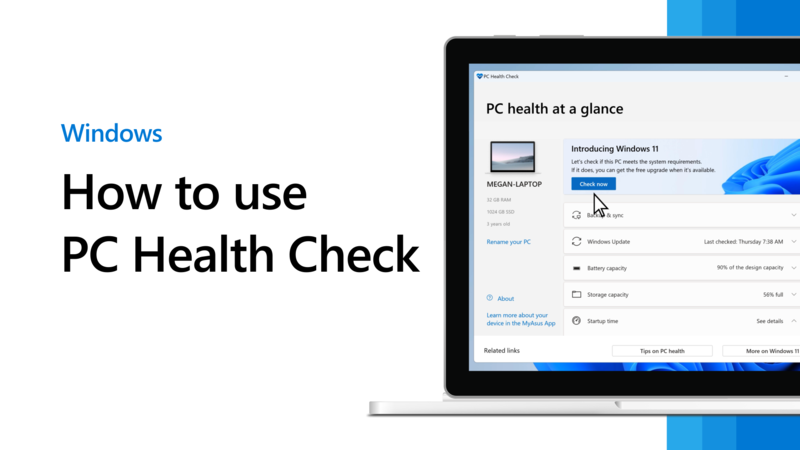
Today, it serves as a centralized dashboard for device health. Instead of digging through multiple sub-menus in Settings, users can launch this app to get instant feedback on key metrics. It provides insights into boot time, storage capacity, backup status, and battery life for laptop users.
Microsoft designed this application to replace the confusion often caused by third-party “PC cleaners.” By offering official support, it ensures that the actions taken—such as deleting temporary files or managing startup apps—are safe and will not corrupt your system files .
Key Features: Beyond Just Compatibility
While the tool is famous for checking Windows 11 eligibility, its feature set is much richer. Here are the core functionalities that make the windows pc health check app a must-have utility.
1. Windows 11 Eligibility Check
The primary function is a deep scan of your hardware. It verifies if your processor is supported, checks if Trusted Platform Module (TPM) version 2.0 is enabled, and ensures Secure Boot is active. If your PC is incompatible, the app does not just say “No.” It provides a specific reason—such as “Disk partition is not GPT” or “TPM 2.0 not found”—and offers links to support documents to help you troubleshoot .
2. Backup and Sync Management
Data loss is a major cause of PC “illness.” This app integrates directly with your Microsoft account. It monitors the status of your OneDrive backup and sync settings. It will alert you if your important folders (Documents, Pictures, Desktop) are not backed up, prompting you to protect your files against drive failures or malware attacks .
3. Storage Health Monitoring
Running out of space is a common reason for sluggish performance. The app visualizes your primary drive usage. If your disk is nearing full capacity, it suggests turning on Storage Sense—a feature that automatically deletes unnecessary files like recycle bin items and old downloads. It acts as an early warning system, preventing system slowdowns before they happen.
4. Battery Capacity Analysis (For Laptops)
For users on the go, battery health is critical. The windows pc health check app compares your current battery’s full charge capacity against its original design capacity. Over time, batteries degrade. If the app reports that your battery is significantly below its original capacity, it provides tips on saving energy and suggests when it might be time for a hardware replacement .
5. Startup Time Insights
Does your PC take ages to boot? The app tracks your startup time performance. If it detects that background programs are slowing you down, it directs you to the Startup tab in Task Manager. Here, you can disable high-impact applications that launch automatically when you log in, leading to a faster boot experience .
How to Download and Run the App
Getting started with the windows pc health check app is a straightforward process. Since it is a Microsoft-published tool, you should only download it from official sources to avoid counterfeit software.
Step-by-Step Guide:
Navigate to the Source: Open your browser and visit the official Microsoft Windows 11 specifications website.
Locate the Tool: Look for the section labeled “PC Health Check.” You will find a button that says “Download PC Health Check App.”
Install: Once the
WindowsPCHealthCheckSetup.msifile downloads, open it. Accept the license agreement.Launch: After installation, click “Finish.” The application will open automatically.
Scan: Click the “Check now” button at the top of the interface. Within seconds, the app will process your hardware configuration and present the results .
Alternative Built-in Tools: The 60-Second Manual Check
While the windows pc health check app is excellent for a visual overview, Windows houses powerful diagnostic tools that do not require any download. If you prefer a hands-on approach or want to double-check your results, Windows has built-in “health check” capabilities via the command line.
The Performance Monitor Report
You can generate a detailed health report in 60 seconds without installing anything.
Press
Win + Ron your keyboard.Type
perfmon /reportand press Enter.Wait 60 seconds as Windows collects data on CPU, memory, disk, and network performance.
This generates an HTML report with color-coded warnings. It catches issues like driver conflicts or high latency that the standard app might summarize .
Reliability History
For tracking crashes and errors over time, search for “Reliability History” in your Start Menu. This tool shows a timeline of application failures, Windows errors, and warnings. It is perfect for diagnosing when a problem started. If your PC crashed on Tuesday, you can look at Tuesday’s log to see exactly which process failed .
Why Avoid Third-Party “Optimizers”?
The internet is saturated with applications claiming to be a “windows pc health check app” but are often malicious or useless. Many “free” optimizers follow a dangerous pattern:
Deceptive Advertising: They show exaggerated issues to scare users into paying for a “Pro” version.
Registry Risks: Cleaning your registry with random tools can break installed software. Microsoft officially warns that registry cleaning is unnecessary for performance and can cause system instability.
Resource Hogging: Some third-party tools run constantly in the background, using the very RAM and CPU cycles they claim to save .
Sticking with the official Microsoft solution ensures you are using a tool that is transparent, free, and designed specifically for your operating system.
Frequently Asked Questions
Does the windows pc health check app run in the background all the time?
No. Unlike antivirus software, this app does not constantly run in the background. It performs a scan only when you manually open it and click “Check now.” This ensures it does not consume your system resources when you are working .
Can this app fix my Blue Screen of Death (BSOD)?
The app is primarily a diagnostic and notification tool. It will alert you to update drivers or check storage, which can prevent BSODs. However, for active crash analysis, the “Reliability Monitor” or “Event Viewer” built into Windows are better suited for deep-dive error logging.
Is it available for Windows 10 only?
While primarily promoted for Windows 10 users looking to upgrade, the app installs and runs perfectly on Windows 11 to help you maintain battery health and storage .
Conclusion
Maintaining your PC does not require expensive software or risky downloads. The windows pc health check app provides a secure, user-friendly gateway to understanding your machine’s needs. From checking if you are eligible for the latest features to simply cleaning up old files, it puts the power of system optimization back into the hands of the user.
By combining this tool with Windows’ native diagnostics like perfmon and Reliability History, you can ensure your device remains fast, secure, and reliable for years to come without ever compromising your safety.