Does Instagram Notify When You Screen Record a Story? (2026 Privacy Guide)

 Digital Marketing
 Does Instagram Notify When You Screen Record a Story? (2026 Privacy Guide)
Because of this temporary nature, users often feel a sense of security. But curiosity is human nature. You might want to save a friend’s travel itinerary, a recipe from a food blogger, or a funny meme to look at later. This leads to the million-dollar question that causes anxiety for millions of users daily: does Instagram notify when you screen record a story?
The short answer is a relief for many: No, generally, Instagram does not send a notification if you screen record a public story, reel, or post.
However, the digital landscape is nuanced. While you are safe recording most content, there are specific, high-privacy areas where Instagram will immediately alert the other person. This comprehensive guide will walk you through the 2026 rules, the specific exceptions you must memorize to avoid embarrassment, and the ethics of saving content.
The Simple Answer: Stories vs. Private Messages
To understand the current policy, we have to look back briefly. In 2018, Instagram tested a feature that notified users when someone took a screenshot of their Story. The backlash was swift. Users felt it stifled engagement, and Instagram quietly scrapped the feature .
As of 2026, that policy remains unchanged for public-facing content. When you hit the record button on a standard Story, the creator has no idea. However, the confusion arises because Instagram has since rolled out “Vanish Mode” and “View Once” features in Direct Messages (DMs), which do have strict protections.
Think of it this way: The “living room” (public Stories and feeds) is fair game for viewing. The “bedroom” (private, disappearing DMs) has alarms installed.
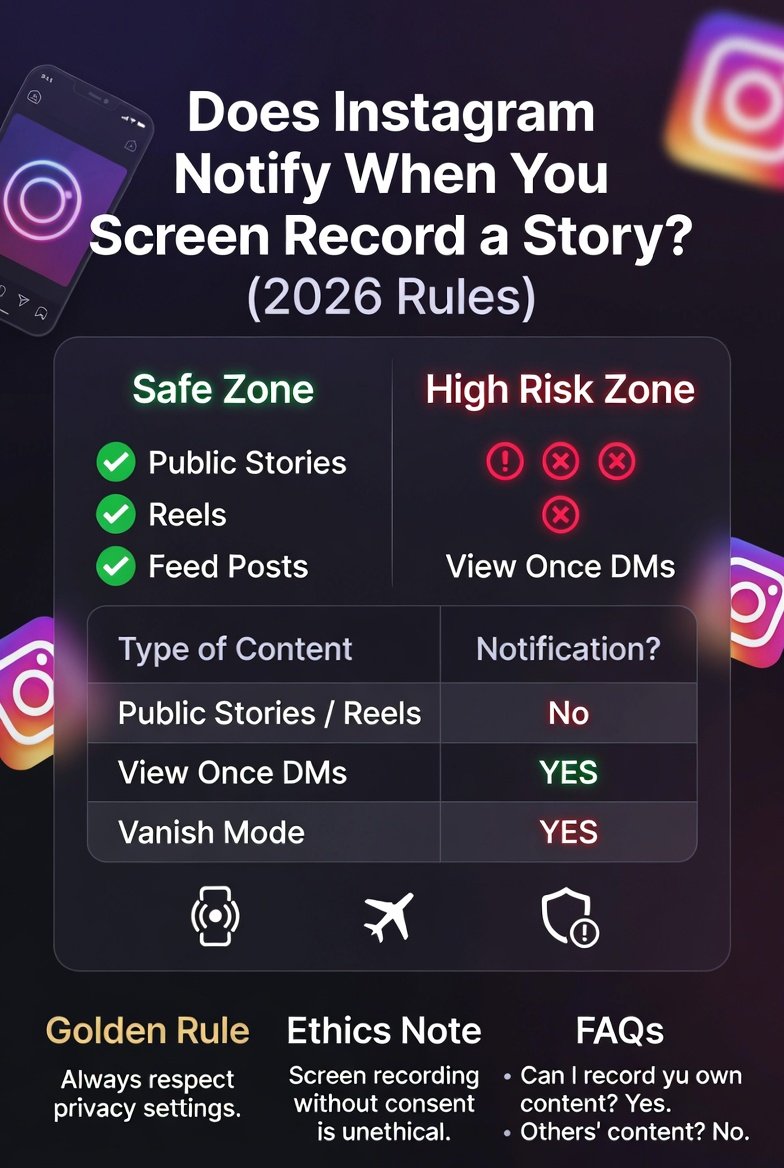
Here is the specific breakdown of whether does instagram notify when you screen record a story depending on the context:
| Type of Content | Screen Recording Notification? | Risk Level |
|---|---|---|
| Public/Private Stories | No | Safe |
| Feed Posts & Reels | No | Safe |
| Story Highlights | No | Safe |
| Profile Pictures | No | Safe |
| Regular DMs (Text/Photos) | No | Safe |
| Live Videos | No | Safe |
| “View Once” Photos/Videos in DM | YES | High Risk |
| Vanish Mode Conversations | YES | High Risk |
The Three Scenarios Where Instagram Will Notify
If you only remember one section from this article, make it this one. To answer does instagram notify when you screen record a story fully, we must look beyond the story itself. The only times you will get caught are within the Direct Message interface. You must avoid screen recording in the following three scenarios:
1. The “View Once” or “Allow Replay” Media
If a friend sends you a photo or video via DM with the “View Once” setting enabled, the intention is clear: they want you to see it, but they do not want it saved. In this specific case, Instagram acts like a security guard.
-
What happens: The moment you attempt a screen recording or even a standard screenshot, the screen flashes a notification.
-
The result: The sender receives a notification inside the chat thread that says, “You took a screenshot.”
-
Why: This feature is designed to protect intimate or sensitive content shared only momentarily .
2. Vanish Mode
Vanish Mode is a chat setting (activated by swiping up in a DM thread) where messages disappear once they are seen and you leave the chat.
-
The trap: If you activate the screen recorder while Vanish Mode is active, Instagram detects the recording of the ephemeral text.
-
The result: The other person is instantly notified that you have captured the conversation .
-
Insight: This is often used for playful or private conversations; recording here is a major breach of trust.
3. Disappearing Photos in Group Chats
Similar to the “View Once” feature, if a disappearing photo is sent in a group DM, the rules are the same. Recording it will trigger a notification for the original sender.
The Golden Rule: If the content has a timer or a “disappearing” label, assume you are being watched. If it is a standard Story or Post, you are invisible.
Does Screen Recording Quality Matter?
You might wonder if Instagram’s detection system is sophisticated enough to differentiate between a screenshot (a single frame) and a full video recording.
Technically, the answer to does instagram notify when you screen record a story does not change based on the length of the recording.
-
Short vs. Long: Recording 3 seconds or 30 seconds yields the same result—no notification for Stories.
-
Audio: Recording with your microphone on or off does not send a trigger.
-
Third-Party Apps: Be wary of apps claiming to “hide” your recording activity. For standard Stories, you don’t need them. For “View Once” media, no third-party app can reliably bypass Instagram’s server-side detection without getting your account banned .
How to Screen Record an Instagram Story Safely (And Ethically)
Since the answer to does instagram notify when you screen record a story is generally “no” for stories, you technically don’t need “tricks.” However, if you want to be extra cautious or if you are trying to save content from a creator you respect, here are best practices to ensure you don’t accidentally trigger a reaction.
Method 1: The Standard Method (Recommended)
This works 100% of the time for Stories.
-
Open Instagram and let the Story load fully.
-
Swipe down from your phone’s top menu to access the control center.
-
Tap the “Screen Recording” button.
-
Return to Instagram and watch the Story.
-
Stop the recording.
-
Result: The creator will not know. You will not appear as a “screenshot threat” in their insights .
Method 2: The Airplane Mode “Paranoia” Trick
Some users still worry that Instagram logs a “view” when you record. If you want to ensure even your view isn’t counted (for creators who check their viewer lists), use this offline method.
-
Open Instagram and wait for all Stories to load on your feed (watch them briefly).
-
Turn on Airplane Mode (disabling WiFi and Cellular data).
-
Go back to the Story and screen record it. Since you are offline, Instagram cannot register the view or the recording.
-
Crucial Step: Force close the Instagram app (swipe it away) before turning Airplane Mode back on.
-
Turn off Airplane Mode.
-
Result: You have the video, and the creator never sees your username in the viewer list .
What About “Close Friends” Stories?
A common follow-up question to does instagram notify when you screen record a story involves the “Close Friends” green ring. The strict answer is No. Even if a Story is exclusive to a small group, the technical privacy settings are the same as a public Story. Instagram does not notify the creator. However, this is the most ethically dangerous territory, as it involves a higher degree of personal trust.
The Creator’s Perspective: Can You Stop Screen Recording?
If you are a content creator worried about people stealing your exclusive Stories, you might be frustrated by the fact that does instagram notify when you screen record a story returns a “No.”
Unfortunately, as of 2026, Instagram does not offer a setting to disable screenshots or recordings for Stories. If a user can see it, they can record it.
What you can do as a creator:
-
Use Highlights Strategically: Save important information to Highlights, but know they are also recordable.
-
Watermark: Add your username or logo moving across the screen. Screen recorders will capture this, giving you credit if it is reshared.
-
Legal Action for Paid Content: If you are selling access to exclusive content (via subscriptions), and it leaks, you can report the user for copyright infringement, even if Instagram didn’t notify you of the recording .
Why Instagram Doesn’t Notify for Stories
You might be asking why the answer to does instagram notify when you screen record a story is different from Snapchat. The reason is user behavior.
-
Snapchat was built on the premise of disappearing content; notifications were core to its DNA.
-
Instagram is a hybrid. It wants the engagement of Stories without the friction. Marketers and brands rely on being screen-shotted.
-
User Testing: When Instagram tested these notifications in 2018, user retention dropped. People were afraid to interact. Instagram decided that the boost in user activity was worth the loss of privacy in this specific area .
The Ethics of Screen Recording
Just because you can do something doesn’t mean you should. Understanding does instagram notify when you screen record a story is about technical safety, but digital etiquette is about personal integrity.
-
Ask Permission: If it is a personal friend or a private account, ask before recording.
-
Don’t Leak: Saving a Story of someone crying or sharing bad news is invasive. Just because the app doesn’t alert them doesn’t mean it is right.
-
Credit the Creator: If you screen record a Reel or a Story to repost on another platform (like TikTok or Twitter), always give credit. Creators can find their content through watermarks and reverse image search, even if Instagram didn’t tell them who took it.
Conclusion: Your 2026 Privacy Checklist
So, to definitively answer the core question: Does instagram notify when you screen record a story? For the vast majority of cases—No.
You can freely screen record:
✅ Regular Stories
✅ Reels
✅ Feed Photos
✅ Highlights
✅ Live replays
You CANNOT screen record without getting caught:
❌ “View Once” photos/videos in DMs
❌ Vanish Mode chats
❌ Disappearing messages in groups
Actionable Takeaways:
-
Don’t stress about recording a random public story; the app will not tattle on you.
-
Never attempt to screen record a “View Once” image. The notification is instantaneous and unavoidable .
-
Use Airplane Mode if you are paranoid about accidentally hitting the like button or leaving a view trace.
-
Respect privacy. The feature exists for a reason. If someone puts a photo in Vanish Mode, they expect it to remain ephemeral.
By understanding these rules, you can navigate Instagram confidently, save the inspiration you need, and avoid those awkward “Why did you screenshot that?” conversations.
Frequently Asked Questions (FAQs)
Q: Does Instagram notify when you screen record a story with sound?
A: No. The presence of audio does not change the notification status. Instagram does not scan the audio track for recording detection.
Q: Can someone see if I screen record their Instagram story if I use a third-party app?
A: For standard stories, no. However, using third-party apps often requires logging in, which violates Instagram’s terms of service and could get your account locked.
Q: Will Instagram ever bring back story recording notifications?
A: As of 2026, there has been no official announcement from Meta (Instagram’s parent company) suggesting they plan to reintroduce this feature. Current trends suggest they are moving away from strict privacy in public feeds.
Q: If I screen record a story, am I removed from the viewer list?
A: No, your username remains in the viewer list unless you use the Airplane Mode trick described above.