
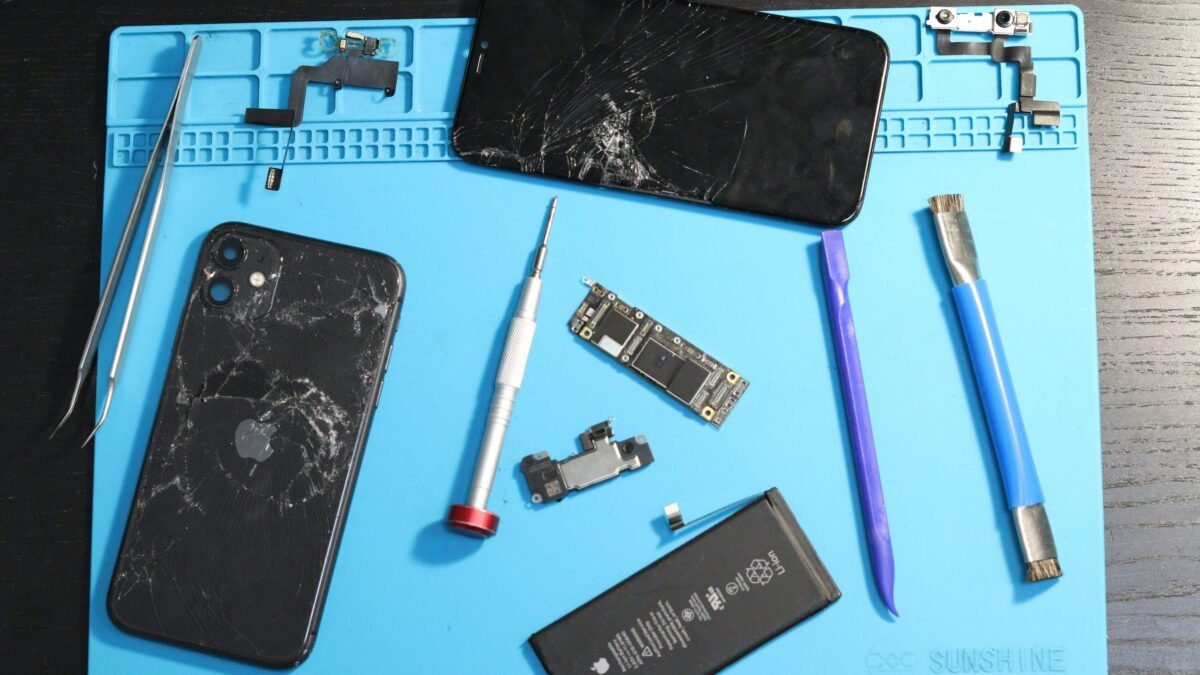
The iPhone 17e is designed for everyday use, but accidental drops can damage its rear glass and leave you wondering whether to repair the phone, replace the damaged component, or purchase another device. If you are searching for iPhone 17e back glass replacement, understanding your repair options, potential costs, safety precautions, and warranty considerations can help you make a better decision.
A cracked back panel does not always mean the entire phone needs to be replaced. However, the right solution depends on the extent of the damage, whether the camera or internal components are affected, and whether your device has AppleCare coverage.
This guide explains how to assess back glass damage, compare professional repair options, avoid common mistakes, and troubleshoot other iPhone problems that may occur around the same time.
 Also readMotherboards Explained: Types, Functions, Features, Prices, and How to Choose the Best Motherboard in 2026
In this article
- What Is iPhone 17e Back Glass Replacement?
- How Much Does iPhone 17e Back Glass Replacement Cost?
- Signs That Your iPhone 17e Back Glass Needs Repair
- Can You Replace iPhone 17e Back Glass Yourself?
- How to Choose the Best iPhone 17e Repair Service
- Other Common iPhone Problems and How to Troubleshoot Them
- Should You Repair or Replace Your iPhone 17e?
- Frequently Asked Questions
- Final Thoughts
What Is iPhone 17e Back Glass Replacement?
iPhone 17e back glass replacement involves removing the damaged rear glass and installing a compatible replacement component using the appropriate repair procedure, adhesive, and tools.
The repair is different from replacing the front display. The rear panel is part of the phone’s carefully assembled enclosure, and removing it incorrectly can damage nearby components.
Depending on the damage and the repair method, a technician may need to inspect the camera area, internal components, adhesive, and enclosure before determining the appropriate repair.
Apple provides an official iPhone 17e repair manual that includes a back glass procedure. An independent guide is also available from iFixit.
Before beginning any repair, consult the relevant instructions for your exact model.
How Much Does iPhone 17e Back Glass Replacement Cost?
The cost of iPhone 17e back glass replacement depends on your country, warranty status, AppleCare coverage, repair provider, parts availability, and the extent of the damage.
There is no single price that applies to every iPhone 17e owner.
Factors that affect repair costs
1. AppleCare coverage
If you have AppleCare coverage, check the applicable accidental-damage terms and service fees. Coverage, exclusions, and available repair options depend on your plan and location.
2. Out-of-warranty repair
Without applicable coverage, you may need to pay the full repair charge. Ask whether the estimate covers only the rear glass or includes additional damaged components.
3. Independent repair providers
Independent technicians may offer different prices and turnaround times. Ask about parts quality, repair experience, warranty terms, and whether any device functionality could be affected.
4. Additional damage
A drop can damage more than the glass. A technician should check the camera, enclosure, charging functionality, and other relevant components before providing a final estimate.
How to check the official repair price
Visit the Apple Repair website and select the available service options for your device and region.
Compare the official estimate with a reputable local provider’s written quote. Make sure both estimates describe the same repair scope before comparing prices.
Signs That Your iPhone 17e Back Glass Needs Repair
Look for these warning signs after dropping your phone:
- Visible cracks or shattered glass on the rear panel.
- Small glass fragments coming loose around the edges.
- Damage near the rear camera area.
- A bent enclosure or visible gaps between components.
- Unusual heating, charging issues, or other problems that started after the impact.
Not every problem is caused by broken back glass. If the phone becomes unusually hot, stops charging, or develops other serious symptoms after a drop, have it inspected rather than assuming a glass-only repair will solve everything.
Can You Replace iPhone 17e Back Glass Yourself?
A DIY repair may be possible for someone with suitable technical experience, the correct tools, and access to model-specific instructions. However, it is not a simple matter of peeling off a glass panel and sticking on another one.
Apple’s repair documentation includes safety guidance, tools, and a dedicated back glass procedure. iFixit’s guide also identifies the adhesive and tools required for the job.
Before attempting a repair, consider these precautions:
- Back up your important data.
- Disconnect charging cables and switch off the phone.
- Follow the official safety instructions for battery handling.
- Wear suitable eye protection and protect your hands from broken glass.
- Use only compatible parts and the specified tools.
- Follow the appropriate assembly and calibration instructions.
- Have a qualified technician handle the job if you lack experience.
Do not apply excessive heat or use improvised metal tools around the battery. Puncturing or damaging a lithium-ion battery can cause a fire or injury.
For most people, a qualified repair provider is the safer option.
How to Choose the Best iPhone 17e Repair Service
Choosing the right technician is just as important as choosing the replacement component.
Before approving a repair, ask the provider these questions:
- Have you repaired this specific iPhone model before?
- What replacement part will you use?
- Does the quoted price include labor and adhesive?
- Is there a written repair warranty?
- Will the repair affect the phone’s water-resistance protection?
- Will any diagnostic checks or calibration procedures be required?
- What happens if additional damage is discovered?
Do not assume that a repaired phone retains its original water resistance. Its condition depends on the repair process and the integrity of the seals afterward. Avoid exposing it to water unless the repair provider can substantiate the device’s condition.
Apple states that Apple-authorized repairs use genuine Apple parts and are covered by applicable Apple service terms. Independent providers may offer their own warranties, but their work is not automatically covered by Apple’s repair warranty.
For more information, consult Apple’s official repair guidance.
Other Common iPhone Problems and How to Troubleshoot Them
Back glass damage is only one reason people look for iPhone repair advice. The following issues are also common troubleshooting topics.
1. How to Fix iPhone Battery Draining Fast
If your iPhone battery is draining quickly, start by checking battery usage in Settings. Look for apps that consume an unusually large amount of power.
Try these steps:
- Open Settings and check Battery usage.
- Review which apps use the most energy.
- Reduce screen brightness when practical.
- Check whether an app is repeatedly using your location.
- Update apps and iOS when appropriate.
- Check battery health and any available service recommendations.
Battery usage can temporarily increase after a software update because the device may perform background tasks. If the battery drains unusually quickly for several days, investigate further.
If the problem began after the phone was dropped, arrange a professional inspection.
2. Why Is My iPhone Overheating While Charging?
An iPhone may become warm during charging, demanding games, video recording, or other intensive tasks. Excessive heat, however, deserves attention.
To troubleshoot:
- Disconnect the charger if the phone becomes excessively hot.
- Move the device away from direct sunlight.
- Remove a case temporarily if it appears to trap heat.
- Inspect the charging cable and adapter for visible damage.
- Close unusually demanding tasks and allow the phone to cool naturally.
Do not put a hot phone in a refrigerator or freezer. Sudden temperature changes and condensation can cause additional damage.
If overheating continues during ordinary use, stop using the device and contact a qualified service provider.
3. How to Fix iPhone Black Screen but Still On
If your iPhone appears to be running but the screen remains black, try a force restart using the instructions for your specific model.
For many recent iPhones, the sequence is:
- Quickly press and release Volume Up.
- Quickly press and release Volume Down.
- Press and hold the Side button until the Apple logo appears.
If the display remains black, connect the phone to a known-working charger and inspect it for signs of physical damage.
A damaged display, battery problem, or internal hardware fault may require professional diagnosis. Avoid repeatedly attempting software fixes if the phone was recently dropped or exposed to liquid.
4. How to Recover Deleted Photos on iPhone
If you accidentally delete photos, check the Recently Deleted album in the Photos app.
Open Photos, locate Recently Deleted, authenticate if required, and select the images you want to recover if they are still available.
If the photos are no longer there, check whether you have an iCloud Photos library, computer backup, or another backup containing them.
Be careful before restoring a complete backup, because doing so may replace some current data. Recovery options depend on your settings, backup history, and how long ago the images were deleted.
5. How to Fix iPhone Not Charging
If your iPhone is not charging, begin with the simplest checks:
- Try a compatible charging cable and adapter that you know work.
- Test a different power outlet.
- Inspect the charging connector for visible damage.
- Check for moisture warnings and follow Apple’s guidance if one appears.
- Restart the phone if it is safe to do so.
Avoid inserting sharp metal objects into the charging port. If the connector is damaged or the phone heats up abnormally, seek professional assistance.
A phone that stopped charging immediately after a drop may have a hardware problem that software troubleshooting cannot resolve.
6. iPhone Storage Full but Nothing on Phone
When your iPhone reports full storage despite appearing to contain very few files, system data, cached content, downloaded media, and application data may be taking up space.
Open Settings, select General, and then iPhone Storage to review the breakdown.
Consider these options:
- Remove downloaded videos and music you no longer need.
- Review large message attachments.
- Offload unused apps.
- Clear Safari website data if appropriate.
- Review large files stored inside individual apps.
Back up important information before deleting files or resetting the device. The amount of system data can change as iOS manages temporary files.
7. How to Transfer Photos from iPhone to Windows PC
You can transfer photos from an iPhone to a Windows computer using a USB cable or an available cloud-based method.
For a cable transfer:
- Connect your iPhone to the computer using a compatible USB cable.
- Unlock the phone and approve the trust prompt if it appears.
- Open the Windows Photos app or File Explorer.
- Import or copy the available photos.
- Confirm that the files open correctly before deleting anything from your phone.
If you use iCloud Photos, downloading the original files to the computer may require additional setup. Keep a backup until you have confirmed that the transfer is complete.
8. How to Fix iPhone Wi-Fi Keeps Disconnecting
If your iPhone repeatedly disconnects from Wi-Fi, determine whether the problem affects one network or several.
Try the following:
- Restart your iPhone and router.
- Check whether other devices experience the same issue.
- Install available software updates.
- Forget the affected Wi-Fi network and reconnect.
- Review router settings if the issue occurs across multiple devices.
Resetting network settings can remove saved Wi-Fi passwords and other network configurations, so use that step only after simpler checks.
9. Refurbished iPhone vs New iPhone in Canada
If your iPhone 17e has extensive damage, you may be comparing a repair with purchasing a replacement device.
A new iPhone offers a fresh device with applicable warranty coverage. A refurbished iPhone may cost less, but its condition, battery health, parts history, and warranty vary by seller.
When comparing options in Canada, consider:
- The total repair cost.
- The price of a comparable new or refurbished device.
- Battery health and remaining expected lifespan.
- Return policies and warranty coverage.
- Whether the replacement device is carrier-compatible.
- The cost and effort of transferring your data.
A refurbished iPhone is not automatically a better deal than repairing your current phone. Compare the full cost and condition of each option before making a decision.
Should You Repair or Replace Your iPhone 17e?
The best choice depends on the extent of the damage and the overall condition of the device.
Consider repair when:
- The damage is limited to the back glass.
- The phone otherwise works normally.
- The repair estimate is reasonable.
- The technician can provide clear warranty terms.
Consider replacement when:
- Several major components are damaged.
- The enclosure is significantly bent.
- Repair costs approach the price of a suitable replacement.
- The device has additional problems that make continued use impractical.
Before deciding, request a diagnosis and compare the repair estimate with the cost of a comparable replacement.
Frequently Asked Questions
How long does iPhone 17e back glass replacement take?
The time depends on the repair method, parts availability, the extent of the damage, and whether additional components require attention. Ask the provider for an estimated turnaround time before booking.
Is it safe to use an iPhone with cracked back glass?
Cracked glass can cause cuts and may allow glass fragments to come loose. Avoid handling exposed fragments, protect the phone from further damage, and arrange a repair. If the phone is unusually hot, swollen, or physically deformed, stop using it and seek professional assistance.
Will back glass replacement delete my data?
A glass repair does not necessarily require erasing the phone, but no repair process is entirely risk-free. Back up your data beforehand and ask the provider whether any reset or software procedure may be necessary.
Does AppleCare cover iPhone 17e back glass damage?
Coverage depends on your AppleCare plan, the applicable accidental-damage terms, and your region. Check your coverage and confirm the service fee with Apple before proceeding.
Can I replace the back glass without replacing the whole phone?
A back glass repair may be possible without replacing the entire device. The appropriate method depends on the damage, model-specific repair procedure, and availability of compatible parts.
Will my iPhone remain waterproof after the repair?
Do not assume it will. A repair can affect the integrity of the original seals. Ask the service provider about sealing procedures and any applicable testing.
Final Thoughts
An iPhone 17e back glass replacement can be a practical option when the damage is limited to the rear panel and the rest of the phone is in good condition. The most important steps are to assess the damage, compare repair estimates, protect your data, and choose a qualified technician.
If your phone also experiences battery drain, overheating, charging failures, or other issues after an accident, have those symptoms checked instead of assuming that replacing the glass will resolve them.
For the most reliable repair information, consult Apple’s official repair resources and the model-specific instructions before attempting any work.
Official resources:
- Apple Repair and Service
- Apple iPhone 17e Repair Manual
- iFixit iPhone 17e Back Glass Replacement Guide
SEO publishing note: The article incorporates the supplied supporting topics naturally. The final search-volume and keyword-difficulty figures should be checked in Semrush or Ahrefs for the target country before publication. Avoid presenting unverified repair prices as official estimates.