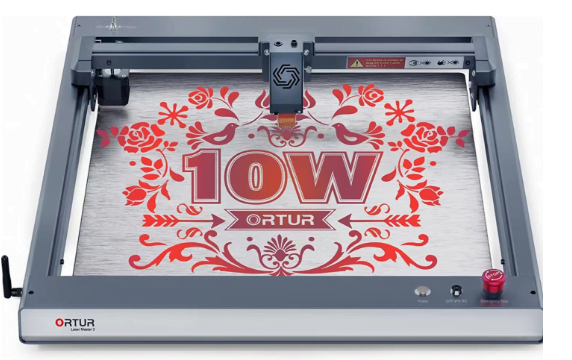
The thought of using a laser engraver has long intrigued me. The capacity to precisely carve and etch designs into materials like wood, metal, and glass seemed to be the ideal fusion of artistic and technology. The process of selecting a laser engraver proved to be more challenging than I had thought, though, as I began to investigate the various alternatives available. Power, size, speed, software, and, obviously, cost were just a few of the variables to take into account.
My unexpected discovery
When it comes to selecting a laser engraver, there are many factors to consider. The type of materials you will be working with, the level of precision you require, and your budget will all play a role in determining which machine is right for you. However, after extensive research and experimentation, I have found that the GearBerry laser engraver is the best option for anyone looking to take their engraving to the next level.
Options you need to consider
Laser power
One of the most significant specifications when selecting a laser engraver is laser power, which is expressed in watts. Thicker and harder materials can be cut and engraved with greater power. Simple engraving projects on softer materials like wood, acrylic, and leather are suitable for a 5–10W laser engraver. Metal tags and accessories can be etched, however the engravings may be shallow and lacking in fine detail. A minimum of a 15-30W laser is advised for high-contrast metal engraving of signs, logos, and lettering as well as for cutting or marking mechanical parts. Deeper metal engraving is possible thanks to the wider beam, more concentrated heat, and stronger material ablation produced by higher power lasers. The enhanced energy density enables them to produce logos with sharper edges and finer details. Nevertheless, more power also leads to more expensive equipment, the need for stronger cooling and ventilation systems, and larger size. A 10W engraver like the Ortur Laser Master 3 may therefore be adequate if your main engraving needs are for wood, acrylic, and plastic. However, investing more money in a 20-50W laser will probably yield better results and a longer return on your investment if high-quality metal engraving is vital.
Engraving speed
Faster speeds are suitable for everyday engraving work since they provide higher throughput and quicker turnaround of projects. For mass production of goods like name tags, badges, and similar things where precise details and ideal aesthetics are not the highest priorities, laser engravers with greater speed are ideally suited. Faster rates, however, entail less control and precision, which leads to coarser edges and surfaces for the engraving. Slower speeds are advised for tasks that need painstaking, premium engraving with fine details and rounded curves, such as personalized gifts, trophies, and medals. Longer engraving times per item are the trade-off, which may affect your workflow if you require a big volume of engraving.
Engraving work area
The biggest dimensions of the item that will fit on the engraving platform of the machine are referred to as the engraving work area, also known as the maximum engraving size or bed size. This specification establishes the largest item size that can be engraved. A minimum engraving space of 400x400mm is advised for the majority of small businesses and hobbyists to fit typical things like nameplates, trophies, gift boxes, and small wooden signs. However, a wider engraving area of 500x500mm is great to allow more freedom if you plan to engrave larger objects like ukuleles, long menus, picture frames, guitar bodies, or thin metal sheets. The ability to engrave entire sheets of materials like acrylic, wood, and metal on larger beds eliminates the need to later combine pieces. Additionally, they offer space for affixing equipment and extensions as needed. Even so, GearBerry larger engraving machines typically require a larger gantry system, which makes them bulkier, heavier, and pricey.
Software
The machine’s included laser engraving software becomes essential since it gives you complete control over the engraving procedure. The difference between a frustrating experience and one that unleashes your creativity is intuitive, trustworthy software. To get perfect engravings, you may look for features like advanced settings for power, speed, and frequency. Support for password security aids in preventing machine misuse. You may import your designs with no conversion problems thanks to compatibility with a broad variety of graphic file types (.png,.jpg,.svg,.ai, etc.). Additionally, you can engrave a wider variety of objects thanks to the ability to import and edit 3D CAD files.
The software should have a clear, logical interface that is easy to use. It should be simple and quick to perform common tasks like maintaining material libraries, setting work origins, and rotating and resizing objects. Before launching full projects, good software will provide simple test engravings to “prove out” parameters.
What’s more, look for capabilities like point-and-click calibration, microscope mode, and node editing to meet your accuracy needs. Repetitive activities can be streamlined by having the option to save and load laser setting profiles for popular materials. Besides, tools that improve the quality and efficiency of your work include automatic corner smoothing, vector tracing, and text wrapping around objects.
Warranty policy
Significant details about the laser engraver’s quality, dependability, and anticipated lifespan can be found in the manufacturer’s warranty policy. A more thorough and prolonged warranty shows the manufacturer has more faith in the components and product. Look for a guarantee that at the very least covers flaws in materials and workmanship for a full year. Within that first year, this ought to cover the repair or replacement of any damaged parts and components. Anything less communicates a lack of confidence on the part of the producer in the durability of their own product.
Conclusion
If I could give anyone looking to purchase a new laser engraver one bit of advice, it would be to avoid becoming overawed by the variety of options and features available at first. Prioritize establishing your primary engraving requirements and goals. Then, depending on those considerations, evaluate engravers using an objective guide or laser buying checklist. You’ll eliminate pointless choices more quickly and focus on the machine that is the perfect fit for you. I hope that this procedure aids in your search for the ideal laser engraver. Wishing you success and happy engraving!
Related posts:

Jacksonville Texas Car Accident December 1st 2025: What Drivers Need to Know About Safety and Respon...
Business
Employment Lawyer for Hostile Work Environment: Your Complete Guide to Protecting Workplace Rights
Business
Why More People Are Switching to Electric Vehicles
Business
5 Business Trends Every Entrepreneur Should Watch in 2026
Business")
Top 7 AI Tools Every Small Business Should Use This Year (2026 Guide)
Business
How Cutting Your Energy Bill Frees Up Money to Invest
Business