Introduction: The Tipping Point for the Lean Leader
You started your small business or agency to pursue a passion, not to chase invoices or calculate tax deductions. For a while, managing a team of freelancers was simple. You sent a PayPal request, Venmo’d a collaborator, or wrote a physical check. But as your reputation grows, so does your network. Suddenly, you are managing a “freelance team under 10 people,” and the “simple” method has become a chaotic mess.

When you manage a distributed workforce of creatives, developers, or consultants, payroll becomes a beast of a different color. You are juggling different hourly rates, project-based fees, international time zones, and the dreaded end-of-year 1099 forms.
This is the exact moment smart founders decide to automate payroll for freelance teams. Automation is not about being lazy; it is about removing friction. It ensures that the people who power your business are paid accurately and on time, while you reclaim your weekends.
In this guide, we will walk through the specific strategies, software, and psychology needed to set up a payroll system that runs itself.
Why Manual Payment Processing Fails Freelancers
Before we dive into the “how,” we must address the “why.” Many small business owners resist automation because they think, “I only have five contractors; I can handle it.” However, manual processing is a silent killer of productivity.
First, there is the time tax. Every time you log into a banking app, type in a name, and enter a variable amount, you are losing 3-5 minutes per person. For ten freelancers paid weekly, that is nearly an hour a week just on data entry.
Second, manual processes breed errors. A typo in an email address or a missed zero can lead to underpayment. Nothing damages a professional relationship faster than a freelancer having to chase you for $50 they are owed. It signals disorganization.
Finally, there is compliance. If you are operating in the United States, paying freelancers (independent contractors) requires specific record-keeping. You need to collect W-9 forms and issue 1099-NECs. Trying to do this manually in December is a recipe for IRS penalties. By choosing to automate payroll for freelance workers, you offload the mental burden of tax season to machines.
The Foundation: Contractor Classification
Before touching a single button on a keyboard, you must ensure your “freelancers” are legally freelancers. The U.S. Department of Labor is cracking down on misclassification.
-
Employees require you to withhold income taxes, Social Security, and Medicare. They are entitled to minimum wage and workers’ comp.
-
Freelancers (Independent Contractors) control how they do the work. You pay them the gross amount agreed upon. They handle their own taxes.
For the purposes of this article (teams under 10 people), we are primarily discussing true freelancers. When you automate payroll for freelance contractors, the system ensures you are not accidentally treating them like employees, keeping your tax profile clean .
Key Features to Look for in Freelance Payroll Software
Not all payroll tools are created equal. Many enterprise solutions are bloated with features for health insurance and 401ks that freelancers don’t need. Here is your checklist:
1. 1099-NEC Processing
The software must automatically generate and file 1099 forms at year’s end. If it doesn’t, keep looking.
2. Multi-Channel Payouts
Freelancers love options. The best systems allow you to pay via direct deposit (ACH), PayPal, Wise (formerly TransferWise), or even debit card.
3. Global Compliance
If your team is remote, you need a tool that handles currency conversion and international tax treaties.
4. No Per-Employee Minimums
Some services charge you a base fee even if you pay no one that month. Look for “pay as you go” pricing or free tiers specifically for small teams .
Top Solutions to Automate Payroll for Freelance Teams
The market has matured beautifully for the “under 10” segment. You no longer need to hire a bookkeeper. Here are the best-in-class options based on current market data.
The Free Path: Payroll4Free and Zoho Payroll
If your budget is absolutely zero, you have options. Payroll4Free is a legitimate service that offers completely free processing for companies with under 10 people . It handles 1099 contractors and direct deposits, though the user interface looks a little dated. For those already in the Zoho ecosystem, Zoho Payroll offers a free tier for up to 5 employees, making it ideal for micro-agencies .
The US-Focused Champion: Gusto
For most small businesses, Gusto is the gold standard. While they cater to all sizes, their “Contractor Only” plan is a game-changer. It costs a monthly base fee plus a small fee per contractor—and you only pay when you run payroll. They handle unlimited payroll runs, offer new-hire reporting (for employees), and crucially, they handle international contractor payments in over 120 countries . The user experience is designed for people who hate accounting.
The All-in-One Operator: Rippling
If you see yourself hiring full-time employees in the next year, Rippling is a powerful, though pricier, option. It allows you to automate payroll for freelance workers while also managing employee benefits and even company laptops in one interface. It is robust, but for a team of 5, it might be “too much car” .
The Ecosystem Player: QuickBooks Payroll
If you already use QuickBooks for your business accounting, adding their contractor-only plan ($15/month) is a no-brainer. It syncs directly with your general ledger, meaning you don’t have to double-enter payments as expenses .
Step-by-Step: Setting Up Your Automated System
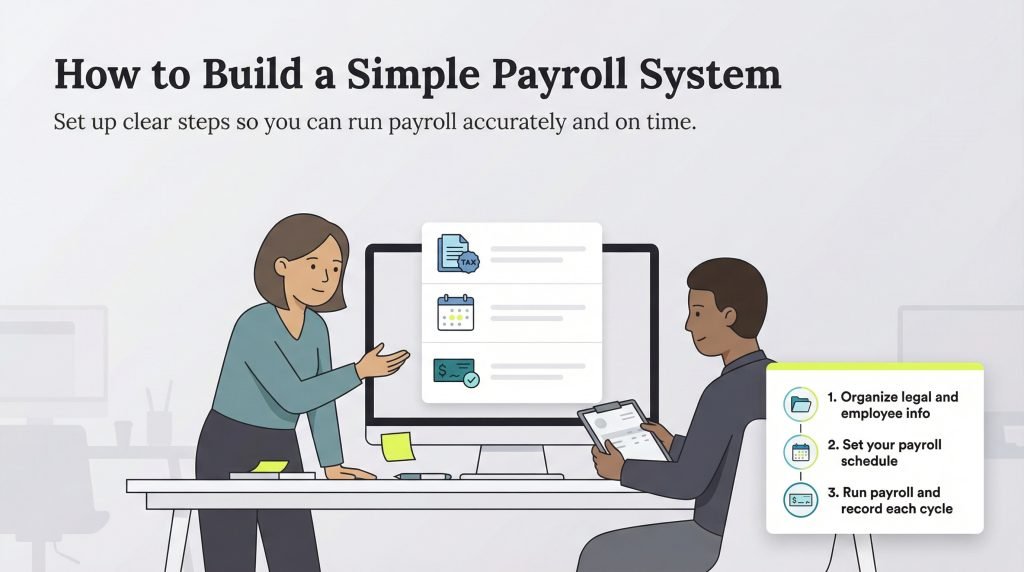
Ready to pull the trigger? Here is the roadmap to go from manual chaos to automated bliss.
Step 1: Centralize Onboarding
Stop accepting W-9s via blurry text message photos. Use your payroll software’s “Onboarding” feature. Send a link to your freelancer. They enter their own banking details, address, and tax ID. This is the first step to automate payroll for freelance teams because you never touch their sensitive data. It is secure and accurate.
Step 2: Standardize Payment Cycles
Freelancers love predictability. Decide on a cadence (Bi-weekly? Monthly? Every Friday?) and stick to it. Set a “hard deadline” in your calendar for time sheet approvals.
Step 3: Integrate Time Tracking
If you pay by the hour, manually adding up Slack messages is a nightmare. Connect your payroll software to a time-tracking tool. Many platforms, like Square Payroll, sync with POS systems or simple timers . Once the freelancer hits “submit,” their hours flow directly into the payroll run.
Step 4: Run the “Silent” Payroll
This is where the magic happens. On payday, you log in, review the pre-filled hours and salaries, and click “Approve.” The system automatically deducts the correct fees (if any), transfers the money, and—most importantly—logs the transaction for your tax records.
The Psychology of Automated Payments
There is a psychological shift that occurs when you automate payroll for freelance workers. For the freelancer, it signals professionalism. They no longer worry about “will I get paid?” This reduces their anxiety, which allows them to focus on doing better work for you.
For you, the business owner, it enforces discipline. When payroll is automated, you must ensure funds are in the account on the 1st and 15th. This forces better cash flow management. You stop treating contractor payments as an afterthought and start treating them as a fixed operational expense, which is a sign of a maturing business.
Common Pitfalls and How to Avoid Them
Even with great software, things can go wrong. Here is how to troubleshoot:
The “Free” Trap
Some platforms advertise as free but charge exorbitant fees for “same-day deposits” or “priority support.” Read the fine print. If a service is truly free (like Payroll4Free), understand that customer support will likely be email-only .
The International Headache
Paying a freelancer in Europe or Asia is different from paying one in Texas. If you use a US-only bank integration, the freelancer gets hit with massive wire fees. Use a global-first platform like Gusto or Deel to pay in local currency . This saves you goodwill.
Ignoring State Laws
Just because you live in Florida does not mean you ignore New York labor laws if your freelancer lives in NYC. Some states have strict rules about payment timing for freelancers. Your software should allow you to set location-based compliance rules .
The Future: AI and Real-Time Payments
Looking ahead to the remainder of 2025 and 2026, the trend is moving toward “instant” payroll. We are already seeing the integration of AI agents that can onboard a new freelancer via WhatsApp or chat, verifying their identity without human intervention .
Furthermore, blockchain and real-time payment networks are making the 3-day ACH wait obsolete. Soon, when you click “pay,” your freelancer in Indonesia will have the funds in their digital wallet within seconds. By adopting a cloud system now, you are future-proofing your business to accept these instant payment methods as they become standard .
Conclusion: Work on the Business, Not in the Bills
Managing a freelance team under 10 people is the “sweet spot” of entrepreneurship. You are big enough to have leverage but small enough to be agile. The worst thing you can do is weigh yourself down with administrative sludge.
By choosing to automate payroll for freelance collaborators, you convert a source of stress into a source of trust. Your team gets paid on time, every time. The government gets its paperwork. And you? You get to close your laptop on Friday knowing that the financial engine of your business is humming along quietly in the cloud.
Start with a free trial of one of the tools mentioned above, onboard one freelancer, and run a test payment. Once you see how easy it is, you will never touch a spreadsheet for payroll again.
Frequently Asked Questions (FAQ)
Q: Is it really safe to connect my business bank account to these tools?
A: Reputable platforms (Gusto, Rippling, QuickBooks) use bank-level encryption (256-bit SSL) and are read-only for payroll. They cannot “withdraw” random amounts without your authorization. Always enable two-factor authentication.
Q: Can I automate payroll for freelance international workers without a US tax ID?
A: Yes. For international independent contractors without an SSN or EIN, you generally do not file a 1099. However, you must still track payments for your own deductions. Platforms like Deel and Gusto handle this by collecting a “Foreign Tax Identification Number” instead.
Q: What happens if I accidentally overpay a freelancer via automation?
A: Most systems have a “payroll correction” or “reversal” feature. You can run an off-cycle payroll to deduct the overage from the next payment. However, you should always communicate with the freelancer first to ensure they agree to the clawback.
Q: Is there a way to automate payroll for freelance creative teams if projects vary month to month?
A: Absolutely. Avoid annual salary tools. Look for “variable pay” or “project-based pay” features. You can enter a one-time bonus or a specific invoice number during each payroll run without changing their base rate.
Additional Resources
To further streamline your business financials, explore these related guides from our archives:
-
Effective Strategies for Managing Small Business Cash Flow – Learn how to keep reserves for payroll during slow seasons.
-
The Top Digital Tools for Remote Team Collaboration in 2025 – Find the best apps to pair with your payroll system for productivity.
-
A Beginner’s Guide to Tax Deductions for Home-Based Businesses – Understand how contractor payments lower your taxable income.
For a deeper dive into the legal definitions of contractors versus employees, you can review the criteria on Wikipedia’s Independent Contractor page.