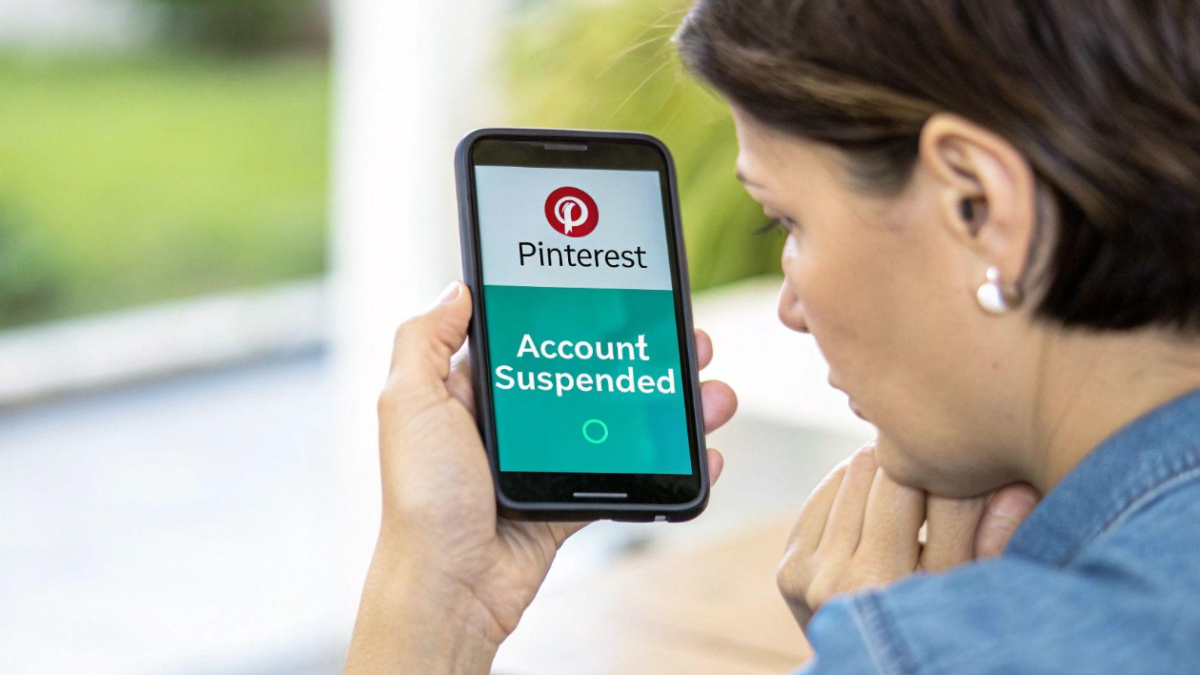
Last spring a small bakery owner I help with marketing sent me a screenshot at 7 a.m. with just three words: “Is this real?” The screenshot showed Pinterest’s red banner telling her the account had been suspended. That account drove almost a third of her online orders. Overnight, every board, every pin, and two years of carefully built traffic had vanished behind a login wall.
We got it back in four days. Since then I’ve helped a handful of other business owners and bloggers through the same panic, and I’ve noticed the same mistakes again and again. If your Pinterest account is suspended, locked, or flagged as spam, this guide walks you through exactly what to do, in the order I’d actually do it.
 Also readWhy Is My Tumblr Blog Not Showing Up in Search Results? 7 Fixes That Work
If Pinterest is a real sales channel for you, it’s worth reading this alongside our wider guide to social media marketing for small businesses, because the biggest lesson from every suspension I’ve seen is simple: never let one platform hold your whole business hostage.
In this article
- Suspended, Locked, Deactivated or Closed? Know Which One You Have
- Why Pinterest Suspends Accounts in the First Place
- Fix 1: Read the Suspension Email Carefully
- Fix 2: Rule Out a Security Lock First
- Fix 3: How to Recover a Suspended Pinterest Account With an Appeal
- Fix 4: Pinterest Marked My Account as Spam — What Now?
- Fix 5: Check Your Website and Domain
- Fix 6: How Long Does a Pinterest Appeal Take?
- Fix 7: How to Reactivate a Deactivated Pinterest Account
- Fix 8: Pinterest Login Not Working at All
- What If Your Appeal Is Rejected?
- Protect Your Pinterest Business Before It Happens Again
- Business Account vs Personal Account: Does It Change Anything?
- My 7-Day Plan After Your Account Is Restored
- Common Mistakes That Make a Suspension Worse
- Quick Troubleshooting Table
- Frequently Asked Questions
- Final Thoughts
Suspended, Locked, Deactivated or Closed? Know Which One You Have
Before you do anything, figure out what actually happened. People use these words interchangeably, but Pinterest treats them very differently, and the fix depends on which one you’re dealing with.
- Suspended: Pinterest believes the account broke its rules. You usually see a suspension notice when you log in and get an email explaining the general reason. This needs an appeal.
- Locked (security lock): Pinterest noticed suspicious activity, such as a login from an unusual location, and locked the account to protect it. This usually needs a password reset, not an appeal.
- Deactivated: You (or someone with your login) paused the account. Your profile is hidden but can be brought back simply by logging in.
- Closed: The account was deleted at your request. Pinterest gives a short window to change your mind before the deletion becomes permanent.
Getting this wrong wastes days. I’ve watched people file three appeals for what was actually a security lock that a two-minute password reset would have fixed.
Why Pinterest Suspends Accounts in the First Place
Pinterest relies heavily on automated systems to catch spam at scale. That keeps the platform usable, but it also means genuine accounts get caught in the net. From the cases I’ve worked on, these are the most common triggers:
- Spam-like pinning behaviour. Pinning dozens of pins in minutes, repeatedly pinning the same link, or running aggressive automation tools.
- Linking to flagged websites. If a domain you link to has been reported or looks like a spam or redirect site, every account pinning it can be flagged too.
- Misleading content. Pins whose image or description doesn’t match where the link goes.
- Community guideline violations. Restricted content, copyrighted images, or harmful claims.
- Suspicious logins. A login from a new country, a shared VA account used across devices, or a compromised password.
- Repeated copyright reports. Several takedown notices against your pins can lead to a suspension.
It’s worth reading Pinterest’s Community Guidelines at least once. Most suspensions I’ve seen weren’t deliberate rule-breaking. They were well-meaning people doing something that simply looked like spam to an algorithm.
Fix 1: Read the Suspension Email Carefully
When Pinterest suspends an account, it normally sends an email to the address on file. Find it before you do anything else, and check your spam and promotions folders too.
The email tells you two important things:
- The general reason (for example, spam or a specific policy area).
- Whether the decision can be appealed.
Write down the reason in your own words. Your appeal will be far stronger if it directly addresses what Pinterest says went wrong, rather than a generic “please restore my account.”
If you can’t find any email, check whether the address on your account is one you still use. An outdated email is surprisingly common with business accounts set up years ago by a former employee or agency.
Fix 2: Rule Out a Security Lock First
If you see a message about unusual activity, or Pinterest asks you to reset your password, you’re probably dealing with a security lock rather than a suspension. This is the best-case scenario.
- Go to the Pinterest login page and choose the option to reset your password.
- Use the reset link Pinterest emails you. Links expire, so use it promptly.
- Choose a strong, unique password you haven’t used elsewhere.
- Once you’re back in, check Settings > Security and log out of any sessions you don’t recognise.
- Switch on two-factor authentication straight away.
Also look through your recent pins and boards. If the account was compromised, attackers often pin spam links, which can turn a security lock into a full suspension later. Delete anything you didn’t post.
Fix 3: How to Recover a Suspended Pinterest Account With an Appeal
If your account is genuinely suspended and the email says you can appeal, this is your main route back. Here’s the process I follow with clients:
- Find Pinterest’s appeal form through the link in the suspension email, or through the account suspension section of the Pinterest Help Center.
- Use the email address linked to the suspended account. Appeals from a different email often stall because Pinterest can’t match them.
- Write a short, calm, specific explanation (template below).
- Submit once, then wait. Don’t send five appeals in a day.
A simple appeal template that works
Keep it brief and factual. Reviewers read a lot of these, and clear ones are easier to approve. Something like this:
Hello Pinterest team,
My account [username / email] was suspended for [reason in the email]. I run [your business / blog], and I use Pinterest to share [what you pin]. I believe the suspension may be linked to [honest likely cause — e.g. a scheduling tool posting too quickly / a link to my old domain]. I’ve since [what you changed — e.g. stopped using the tool / removed the link]. I’ve reviewed the Community Guidelines and will follow them. I’d be grateful if you could review my account.
Thank you,
[Your name]
Notice what’s missing: no anger, no threats, no “this is ridiculous.” I know the frustration is real, but a hostile appeal helps no one.
Fix 4: Pinterest Marked My Account as Spam — What Now?
“Spam” is by far the most common suspension reason I see, and it’s the one that frustrates honest users most. The bakery owner I mentioned was flagged as spam purely because a scheduling tool had published 40 pins in one burst after a sync error.
If spam is the reason, your appeal should explain the behaviour that probably triggered it, then show that you’ve fixed it. Common fixes include:
- Slowing your pinning pace. Spread pins across the day instead of bulk-publishing.
- Pausing third-party automation until the account is restored, then using only Pinterest-approved partners.
- Varying your pins. Fresh images and descriptions rather than the same pin re-uploaded repeatedly.
- Checking your website. If your domain uses aggressive redirects, pop-ups, or has been hacked, Pinterest may see it as spammy. Clean it up first.
That last point matters more than people expect. If a hacked website is behind the problem, your Pinterest account will keep getting flagged until the site itself is fixed.
Fix 5: Check Your Website and Domain
This is the step most guides skip, and it’s often the real cause. Pinterest evaluates the links you pin, not just your behaviour. If your domain has a problem, every account that pins it can be affected.
Work through this quick checklist:
- Visit your own site on a phone using mobile data, not your home Wi-Fi. Look for strange redirects or pop-ups you didn’t add.
- Check Google Search Console for security warnings or manual actions.
- Update WordPress, themes and plugins. Outdated plugins are a common way sites get injected with spam links.
- Remove link shorteners from pins. Pinterest prefers direct links to the real destination.
- Claim your website on your Pinterest business account once you’re restored. It adds a layer of trust.
If your site turns out to be the problem, our guide to protecting your business website from hackers covers the basic security fixes every small business site should have in place.
Fix 6: How Long Does a Pinterest Appeal Take?
There’s no published guaranteed timeframe, and from what I’ve seen it varies a lot. Some appeals come back in a day or two; others take a week or longer, especially during busy periods.
While you wait:
- Don’t create a new account to get around the suspension. Pinterest may treat that as evading enforcement, which can make things worse for both accounts.
- Don’t flood the appeal form. Multiple submissions can slow things down rather than speed them up.
- Watch your inbox, including spam folders, for replies from Pinterest.
- Keep a record of the date you appealed and what you wrote.
If more than a couple of weeks pass with no response, it’s reasonable to submit one polite follow-up through the Help Center, referencing your original appeal date.
Fix 7: How to Reactivate a Deactivated Pinterest Account
If you deactivated the account yourself, recovery is easy:
- Go to Pinterest and log in with your usual email and password.
- Pinterest will ask whether you want to reactivate. Confirm.
- Your profile, boards and pins should reappear.
If you forgot your password, reset it first and then log in. If you closed (deleted) the account rather than deactivating it, act quickly: Pinterest gives a limited window after a closure request during which logging back in can cancel the deletion. After that, the account and its content are gone for good.
Fix 8: Pinterest Login Not Working at All
Sometimes the issue isn’t a suspension at all — you just can’t get in. Before assuming the worst, try these quick checks:
- Confirm which login method you used. Many people originally signed up with Google, Facebook or Apple and are now trying an email and password that never existed.
- Clear your browser cache or try another browser, or the Pinterest app instead of the website.
- Check for an outage. Occasionally Pinterest itself has problems.
- Update the app if you’re on mobile.
- Turn off VPNs temporarily, since logins from unexpected locations can trigger security checks.
What If Your Appeal Is Rejected?
It happens, and it’s painful, especially for a business. If Pinterest upholds the suspension:
- Read the reply carefully. Sometimes it hints at what content caused the issue.
- Fix the root cause anyway. Clean up your website and your pinning habits, because those issues will follow you to any future account.
- Respect the decision on account creation. Check Pinterest’s terms before creating a replacement account; a permanent suspension may mean you’re not allowed to.
- Shift traffic to channels you own. Your email list and website can’t be suspended by a platform.
Protect Your Pinterest Business Before It Happens Again
After going through a suspension with clients, I now recommend the same set of habits to everyone who earns money from Pinterest. They take an afternoon to set up and dramatically lower your risk.
- Turn on two-factor authentication and use a password manager.
- Use a business account with an email address the business controls, not a staff member’s personal inbox.
- Pin at a natural pace and stick to Pinterest-approved scheduling partners.
- Keep your website secure and updated, and claim it on Pinterest.
- Use original images, or ones you have the rights to.
- Back up your best content. Keep a spreadsheet of your top pins, their images, titles and target URLs so you can rebuild if needed.
- Grow an email list from Pinterest traffic so your audience isn’t tied to one platform.
If you’d rather have professionals manage this for you, a specialist service such as [CLIENT LINK] can help keep your social media accounts compliant, secure and growing while you focus on running the business.
For a broader look at building traffic that doesn’t depend on any single platform, our guide on email marketing tips for small businesses is a good next read.
Business Account vs Personal Account: Does It Change Anything?
A question I get a lot is whether switching to a Pinterest business account protects you from suspension. Short answer: no account type is immune, but a business account does give you useful advantages when something goes wrong.
- Analytics history. A business account shows you exactly when pinning activity spiked, which helps you explain the likely trigger in your appeal.
- A claimed website. Claiming your domain connects your pins to a verified site, which signals that you’re a genuine publisher rather than a link farm.
- Clearer ownership. When the account is registered to a business email, there’s no confusion about who has the right to appeal.
The flip side is that business accounts tend to pin more, and more often, which is exactly the kind of activity automated spam filters watch. So a business account is worth having, but it raises the importance of a sensible pinning pace rather than replacing it.
My 7-Day Plan After Your Account Is Restored
Getting reinstated is a relief, but the first week back matters. Accounts that jump straight back into heavy pinning sometimes get flagged again within days. Here’s the routine I give clients once Pinterest restores their access:
- Day 1: Change your password, turn on two-factor authentication, and review every active login session. Remove access for any tool or person you no longer use.
- Day 2: Audit your last 50 pins. Delete broken links, duplicates, and anything pointing to pages that no longer exist.
- Day 3: Check your website again for redirects, security warnings, and outdated plugins. Fix anything you missed during the suspension.
- Day 4: Pin lightly and manually — just a few fresh, original pins. Let the account show normal, human behaviour again.
- Day 5: Reconnect only one approved scheduling tool, and set a conservative daily limit.
- Day 6: Back up your best-performing pins and boards in a simple spreadsheet so you’re never starting from zero again.
- Day 7: Add an email sign-up offer to your most popular pinned pages, turning Pinterest visitors into an audience you own.
It sounds cautious, and it is. But in my experience, the accounts that ease back in like this are the ones that stay out of trouble afterwards.
Common Mistakes That Make a Suspension Worse
Panic leads to decisions that can turn a short suspension into a permanent one. Avoid these:
- Sending angry or threatening appeals. Reviewers are people; make their decision easy, not personal.
- Blaming Pinterest without checking your own setup. A hacked plugin or an over-eager scheduler is usually closer to home than you’d think.
- Buying “recovery services” that claim insider access. Only Pinterest can reverse a suspension, and handing your login to a stranger adds a security risk on top.
- Re-pinning the same flagged link from another account. If a domain is the problem, it’ll be a problem everywhere.
Quick Troubleshooting Table
| What you see | What it usually means | Best next step |
|---|---|---|
| Suspension notice + email | Pinterest thinks you broke a rule | Fix the cause, then appeal (Fix 3) |
| “Unusual activity” or reset prompt | Security lock | Reset password, enable 2FA (Fix 2) |
| Suspended for spam | Pinning pattern or flagged links | Slow down, pause tools, appeal (Fix 4) |
| Keeps getting flagged | Problem with your website | Check and secure your domain (Fix 5) |
| Profile hidden after you paused it | Deactivated | Log in and reactivate (Fix 7) |
| Can’t log in, no notice | Wrong login method or app issue | Check sign-in method, clear cache (Fix 8) |
Frequently Asked Questions
Can a suspended Pinterest account be recovered?
Often, yes — especially when the suspension was triggered by automated spam detection. A clear, honest appeal that explains what happened and what you changed gives you the best chance.
Will I lose my pins and followers if my Pinterest account is suspended?
While suspended, your content isn’t visible. If the appeal succeeds, your boards, pins and followers usually return. If the suspension is permanent, that content is generally lost, which is why backing up your best pins matters.
Why was my Pinterest account suspended for no reason?
There’s almost always a trigger, even if it isn’t obvious: a burst of automated pins, a link to a flagged or hacked website, or a login from an unusual location. Check the suspension email and your website first.
Can I just create a new Pinterest account?
Making a new account to get around a suspension can break Pinterest’s rules and put the new account at risk too. Appeal first, and check Pinterest’s terms before starting over.
Is Pinterest still worth it for business after a suspension?
For many businesses, yes. Pinterest remains a strong source of long-term search traffic. The key is to treat it as one channel among several, not the only one.
Does using a scheduling tool get your Pinterest account suspended?
Not by itself. Pinterest works with approved scheduling partners, and plenty of businesses use them safely. Problems usually start when a tool publishes too many pins too quickly, repeats the same link over and over, or isn’t an approved partner. Keep your schedule moderate and varied.
How can I contact Pinterest support directly about a suspension?
The most reliable route is the appeal form and contact options in the Pinterest Help Center, using the email address tied to your account. Messages sent through social media or unofficial channels rarely reach the right team.
Final Thoughts
A Pinterest account suspended notice feels like a disaster, especially when the platform pays your bills. But in most of the cases I’ve handled, it was a fixable misunderstanding between a real business and an automated system. Identify whether you’re suspended, locked or deactivated; fix the likely cause; and send one calm, specific appeal.
Then, once you’re back, put the protective habits in place. The bakery owner I mentioned now has 2FA, a slower pinning schedule, a secured website, and a growing email list. Her Pinterest traffic is higher than ever, and if anything goes wrong again, her business won’t stop with it.
Have you been through a Pinterest suspension? Share what happened in the comments below. Your experience could help another business owner get their account back faster.