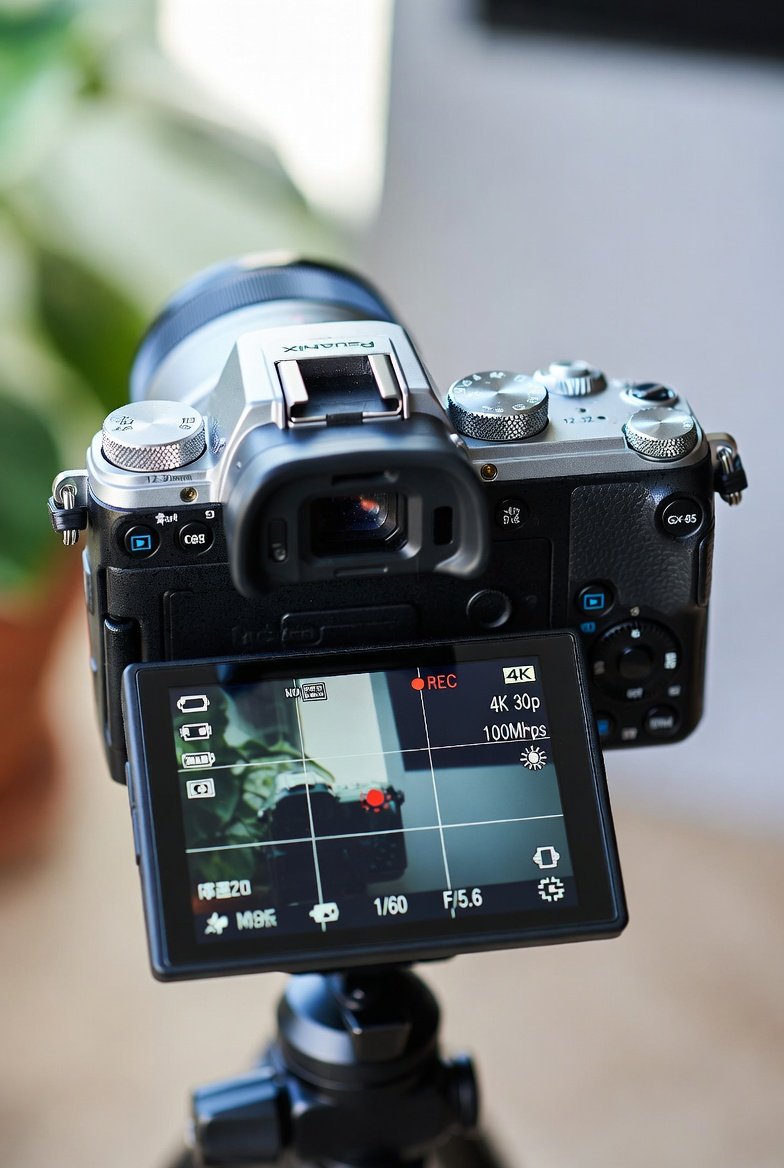
The Panasonic Lumix DMC-GX85 GX80 combines portability with powerful video features. Its 16MP Live MOS sensor without an anti-aliasing filter produces sharp details, while 4K video at up to 30fps (or 24fps) with a 100Mbps bitrate delivers crisp, detailed footage suitable for modern platforms like YouTube and Instagram.

Key advantages for vloggers include:
- Compact design: Lightweight body (around 426g with battery) fits easily into a small bag, perfect for on-the-go shooting.
- Tilting touchscreen LCD: The 3-inch, 1.04M-dot display flips up for easy self-framing during solo vlogs.
- Built-in electronic viewfinder (EVF): A 2.76M-dot field-sequential EVF helps in bright conditions.
- Wi-Fi connectivity: Transfer footage quickly or control the camera remotely via a smartphone app.
- 4K Photo modes: Extract 8MP stills from 4K bursts, useful for thumbnails or hybrid photo-video workflows.
For beginners, the camera’s intuitive menu system and creative modes lower the learning curve. Its Dual I.S. (combining in-body 5-axis stabilization with compatible lens OIS) minimizes shake during handheld walking shots—a common challenge in vlogging.
Many users appreciate its value, especially on the used market, making it accessible for those starting out. While it lacks a microphone input (a notable limitation for serious audio work), external recorders or the built-in stereo mic with wind filter suffice for many entry-level creators.
Panasonic GX85 Vlogging Setup Guide
Setting up your Panasonic Lumix DMC-GX85 GX80 properly ensures reliable performance from day one. Follow this step-by-step guide tailored for vlogging.
1. Essential Accessories for Vlogging
Start with these items to enhance usability:
- Wide-angle lens: The kit 12-32mm f/3.5-5.6 provides a versatile focal range. Pair it with the 14-42mm or a prime like the Panasonic 20mm f/1.7 for better low-light performance and bokeh.
- Tripod or selfie stick: A lightweight tripod with a phone mount adapter helps for stable talking-head shots.
- External audio solution: Since there’s no mic jack, use a separate recorder (like a Zoom H1n) synced in post-production.
- Spare batteries and fast SD cards: UHS-I U3 or higher cards handle 4K recording without issues. Carry at least two batteries for extended sessions.
- Screen protector and camera strap: Protect the tilting LCD during travel.
2. Initial Camera Configuration
Power on the camera and navigate to the setup menu:
- Set date, time, and language.
- Enable Touch AF and Touch AE for quick focus and exposure adjustments on the touchscreen.
- Turn on Focus Peaking (under Custom menu) to visualize sharp areas during manual focus.
- Activate the electronic shutter for silent operation—ideal for quiet environments or avoiding shutter shock in video.
- Customize the Q.Menu (Quick Menu) for fast access to video quality, white balance, and stabilizer settings.
For vlogging, assign frequently used functions to function buttons (Fn1-Fn9) via the custom menu. Place video record quality on Fn3, for example.
3. Basic Vlogging Workflow
- Mount the camera on a gimbal or handheld rig for mobility.
- Frame yourself using the tilting screen in selfie position.
- Use continuous AF (AFC) with face/eye detection for tracking while walking and talking.
- Monitor audio levels in the menu to avoid clipping, and enable the wind cut filter for outdoor shoots.
Practice in a well-lit room first to build confidence before heading outdoors. Many beginners report that the camera’s responsive touchscreen makes adjustments feel natural and smartphone-like.
Lumix GX80 4K Video Tips for Beginners
The Lumix GX80 (European naming for the similar GX85) excels in 4K but requires thoughtful settings to maximize quality for vlogs. Here are beginner-friendly tips:
Choose the Right Recording Format:
- Use MP4 for 4K—it’s widely compatible and easier to edit.
- Bitrate: Select the highest available, typically 100Mbps for 4K, to preserve detail and allow better grading in post.
Frame Rate Selection:
- 4K 30fps or 24fps: 30fps offers smoother motion for everyday vlogs; 24fps gives a cinematic look popular in storytelling content.
- Full HD 60fps: Switch to 1080p/60p when you need slow-motion flexibility or better low-light performance (4K tops out at 30fps).
Exposure and Focus Tips:
- Start in Shutter Priority (S) mode. Set shutter speed to double the frame rate (e.g., 1/60s for 30fps) to maintain natural motion blur.
- Use Aperture Priority (A) for controlling depth of field—wider apertures (lower f-numbers) create pleasing background blur.
- Enable i.Dynamic for better highlight and shadow recovery in high-contrast scenes like outdoor vlogs.
- Zebra patterns help monitor overexposure; set them at 80-90% for skin tones.
Color and Picture Profiles:
- Natural or Standard photo style works well for vlogs, offering balanced skin tones without heavy processing.
- Avoid overly saturated “Vivid” unless you want punchy colors for lifestyle content.
- Adjust contrast, sharpness, and saturation subtly in the menu for a clean base to grade later.
Audio Basics:
- Record with the built-in mic and enable wind filter.
- Speak clearly and maintain consistent distance from the camera. In post, use free tools like Audacity to clean up noise.
Pro Tip: Test clips in different lighting. The sensor handles up to ISO 3200 reasonably well in 4K, but keep it below 1600 for cleaner results. Use natural light or affordable LED panels for indoor setups.
Panasonic DMC GX85 Best Video Settings
For optimal vlogging results on the Panasonic DMC-GX85 GX80, use these recommended settings as a starting point. Customize based on your environment.
Recommended 4K Settings:
- Recording Quality: 4K 30p or 24p at 100Mbps (MP4)
- Exposure Mode: Shutter Priority or Manual
- Shutter Speed: 1/60s (for 30fps) or 1/50s (for 24fps)
- Aperture: f/4 to f/8 for balanced sharpness and depth (adjust for creative effect)
- ISO: Auto with limit at 1600, or manual for consistency
- White Balance: Auto or custom preset for your lighting
- AF Mode: Continuous AF with Face/Eye Detection
- Stabilizer: On (Dual I.S. when using compatible lenses)
- Picture Style: Natural with slight adjustments (+1 contrast, -1 sharpness for natural look)
- Metering: Multi or Center-weighted
Additional Menu Tweaks:
- i.Resolution: On for enhanced detail
- Highlight Shadow: Adjust curve for better dynamic range
- 4K Live Cropping: Useful for adding subtle pans or zooms in post without cropping too aggressively
- Silent Mode: Enable for discreet recording
For Handheld Walking Vlogs: Combine these with slow, deliberate movements. The camera’s stabilization shines here, reducing the need for expensive gimbals initially.
Experiment in short test clips. Many vloggers shoot in 4K and downscale to 1080p for final delivery—this improves sharpness and compresses file sizes nicely.
GX85 vs GX80 Difference Explained
The GX85 and GX80 are essentially the same camera with regional naming variations. The Panasonic Lumix DMC-GX85 GX80 shares identical core specifications, including the 16MP sensor, 5-axis Dual I.S., 4K video, and compact body.
Key Differences:
- Video Recording Limit: The GX80 (often sold in Europe/PAL regions) may impose a 29:59 continuous recording limit due to regulations. The GX85 (NTSC/US version) typically allows unlimited recording (or longer sessions until the card or battery runs out).
- Frame Rates: Minor variations in available 50p/60p options depending on region, though 4K remains 24/25/30p.
- Bundled Options and Firmware: Slight differences in default language, power adapters, or included accessories, but performance is identical.
In practice, most users treat them interchangeably. If buying used, check the region code and confirm the video limit matches your needs. For vlogging, the unlimited recording on GX85 models provides more flexibility for longer takes.
Both versions deliver the same excellent image quality, with the no-AA-filter sensor contributing to sharper details than some contemporaries.
Lumix GX85 Image Stabilization for Handheld Video
One of the Panasonic Lumix DMC-GX85 GX80’s strongest features for vloggers is its 5-axis Dual I.S. system. It combines in-body sensor-shift stabilization (5 axes, including rotation) with lens-based Optical Image Stabilization (OIS) on compatible Panasonic lenses.
How It Benefits Handheld Vlogging:
- Reduces shake during walking, talking, or panning shots.
- Works effectively in 4K video mode—unlike some earlier models.
- Provides up to 4-5 stops of stabilization, allowing slower shutter speeds in low light without blur.
Tips for Maximum Effectiveness:
- Use Panasonic lenses with OIS (e.g., 12-32mm kit lens) to activate Dual I.S.
- Enable stabilizer in the menu and set to “Normal” or “Active” mode for video.
- Hold the camera steadily with both hands; avoid sudden jerks.
- Combine with a lightweight gimbal for ultra-smooth results in dynamic scenes.
Real-world tests show remarkably steady footage even at wider focal lengths while walking. This makes the camera forgiving for beginners who haven’t mastered smooth camera movement yet. For extreme stability, pair it with a monopod or chest rig.
Note: Electronic stabilization (EIS) options exist but may crop the frame slightly—test both and use Dual I.S. as primary.
Advanced Tips and Common Beginner Mistakes to Avoid
Enhance Your Vlogs Further:
- 4K Photo and Post Focus: Capture bursts and refocus after shooting—great for selecting perfect expressions in talking-head segments.
- Time-Lapse and Stop Motion: Built-in modes add creative variety to your channel.
- External Monitoring: Use HDMI output (while recording) with an external recorder for better audio options.
- Post-Production Workflow: Edit in DaVinci Resolve or Premiere. Color grade lightly to match your style, and stabilize further if needed with software like Warp Stabilizer.
Avoid These Pitfalls:
- Over-relying on Auto modes—manual control builds skills faster.
- Ignoring audio—poor sound ruins great visuals; always plan for it.
- Overheating in long 4K sessions (rare but possible in hot environments—keep the camera ventilated).
- Neglecting battery life—4K drains power quicker than stills.
Join online communities like Reddit’s r/M43 or r/videography for user-shared presets and experiences.
For more insightful articles on content creation and digital tools, explore resources at BusinessToMark.
Additionally, learn more about the camera’s technical background on Wikipedia’s Panasonic Lumix page for broader context on the Micro Four Thirds system.
Conclusion: Take Action and Start Vlogging Today
The Panasonic Lumix DMC-GX85 GX80 remains a capable, budget-friendly choice for beginner vloggers in 2026. Its 4K video capabilities, robust image stabilization, and compact form factor provide everything needed to produce engaging content without breaking the bank.
Actionable Takeaways:
- Set up your camera using the recommended 4K 30p/100Mbps settings with a 1/60s shutter.
- Prioritize Dual I.S. and a good wide lens for smooth handheld vlogs.
- Practice exposure and focus in Shutter Priority mode before going manual.
- Invest in basic accessories like extra batteries and an external audio solution.
- Shoot test footage, review it critically, and iterate on your settings.
- Edit consistently and upload regularly to build your audience.
With patience and these practical insights, you’ll quickly see improvement in your vlogging quality. The Panasonic Lumix DMC-GX85 GX80 proves that great content comes from smart technique, not just expensive gear. Grab your camera, head outside, and start telling your stories—one steady 4K clip at a time.