
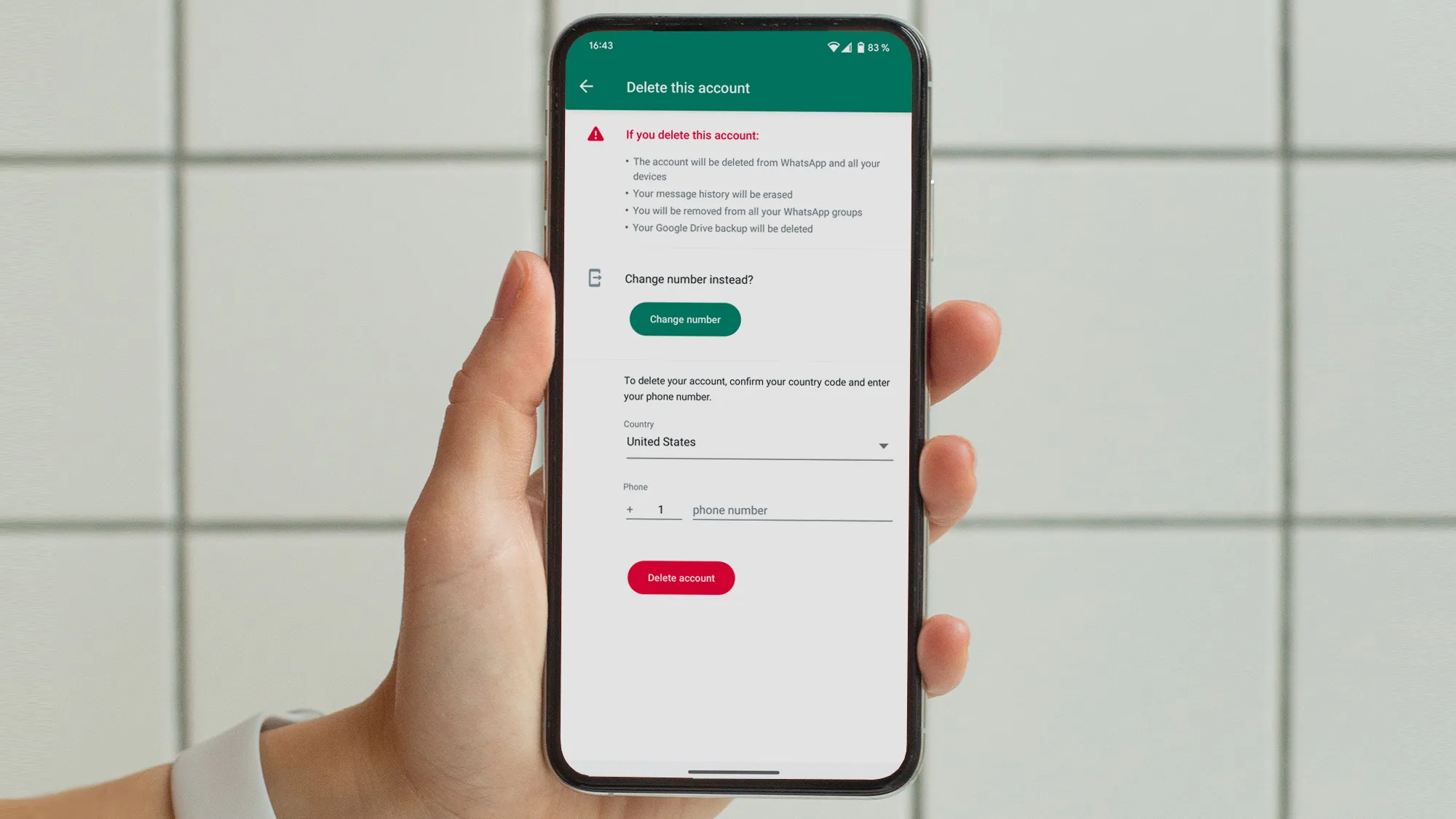
Have you ever wondered how to delete whatsapp account? Maybe you want a fresh start, or you’re switching to another app. Whatever the reason, deleting your WhatsApp account is straightforward. This guide walks you through the process step by step. We cover everything from preparation to what follows. Rest assured, you can do this safely and quickly.
WhatsApp started in 2009 as a simple messaging tool. Founders Jan Koum and Brian Acton aimed to make chatting easy without ads. By 2014, Facebook bought it for $19 billion. Now, over 2 billion people use it worldwide. In places like Pakistan, it’s a daily essential for calls and texts. But sometimes, users need to step away. Reasons include privacy worries or too many notifications. Deleting your account erases your presence from the app.
Before you begin, back up your chats. This saves messages and media. Go to Settings > Chats > Chat backup. Tap Back up. This stores data in Google Drive for Android or iCloud for iPhone. Remember, after deletion, you can’t restore without a backup.
 Also readI Tested 20 Free and Paid Video Editing Tools in 2026 — Here’s Which One Actually Fits You
In this article
- Why You Might Want to Delete Your WhatsApp Account
- Preparing to Delete Your WhatsApp Account
- How to Delete WhatsApp Account on Android
- How to Delete WhatsApp Account on iPhone
- What Happens After You Delete Your WhatsApp Account
- Common Issues When Deleting WhatsApp Account
- Alternatives to Deleting Your WhatsApp Account
- Data Privacy and WhatsApp
- Re-creating a WhatsApp Account After Deletion
- FAQs on How to Delete WhatsApp Account
- Conclusion
- References
Why You Might Want to Delete Your WhatsApp Account
People delete accounts for many reasons. Privacy is a big one. WhatsApp uses end-to-end encryption, but some users still feel exposed. Others delete to reduce screen time. A study by Statista shows WhatsApp has 2.78 billion active users in 2024. Yet, millions delete accounts yearly due to spam or harassment.
Deleting clears your profile photo, status, and groups. It stops unwanted messages. If you’re blocked by someone, you might see only one check on sent messages. For more on that, check this guide on one check meanings. It’s helpful to know these signs before deciding.
Consider alternatives first. You can mute chats or archive them. Or, use privacy settings to hide your last seen. But if deletion is your choice, proceed with confidence.
Preparing to Delete Your WhatsApp Account
Get ready before you delete. First, update the app. Old versions might glitch. Go to your app store and check for updates.
Next, note your phone number. You’ll need it in international format, like +92 for Pakistan.
If you own channels, add admins first. Deletion removes you as admin, and channels without admins vanish.
Export important chats. Tap a chat, then More > Export chat. This saves texts as a file.
Finally, inform contacts. Tell friends you’ll be off WhatsApp. Suggest other apps like Signal or Telegram.
These steps make the process smooth. Now, let’s dive into how to delete whatsapp account?
How to Delete WhatsApp Account on Android
Android users follow these easy steps. Open the app on your phone.
- Tap the three dots in the top right corner.
- Select Settings. This opens the menu.
- Go to Account. Here, you manage your profile.
- Choose Delete my account. It’s at the bottom.
- Enter your phone number. Use full format, like +923001234567.
- Pick a reason. Options include “I no longer use it” or “Privacy concerns.”
- Tap Delete my account. Confirm if asked.
Done! Your account deletes right away. For official details, see WhatsApp’s deletion guide.

This image shows the uninstall screen, but remember, uninstalling the app alone doesn’t delete your account. You must use the in-app feature.
How to Delete WhatsApp Account on iPhone
iPhone steps are similar. Start in the app.
- Tap Settings at the bottom.
- Select Account.
- Choose Delete My Account.
- Enter your number in international format.
- Select a reason from the list.
- Tap Delete My Account. Confirm.
That’s it. Quick and simple. If you’re on iOS, backups go to iCloud. Ensure you have one before deleting.
See this settings screen? It highlights where to find chat options, close to account deletion.
What Happens After You Delete Your WhatsApp Account
Deletion is permanent. You can’t undo it. Here’s what changes:
- Message history vanishes. All chats delete from your device.
- Groups remove you. You leave all groups automatically.
- Profile info erases. No more photo or about section.
- Backups delete. Google Drive or iCloud removes them.
- Channels affect. If you own one, it might delete without admins.
WhatsApp keeps some data for 90 days. This is for legal reasons, like backups for recovery. But your account info goes away fast.
Others might still see old messages you sent. Deletion doesn’t remove those from their phones.
If contacts see your profile after deletion, ask them to restart WhatsApp. This refreshes their list.
A 2023 report by Pew Research notes 45% of users delete apps for privacy. WhatsApp’s policy aligns with this, as per their privacy info.
This infographic shows WhatsApp’s user growth. Imagine the opposite—how many delete accounts yearly.
Common Issues When Deleting WhatsApp Account
Sometimes, things go wrong. If the app crashes, restart your phone. Check internet connection too.
Can’t find the delete option? Update the app. Old versions hide it.
If you’re on a linked device, log out first. Deletion only works on the primary phone.
Blocked by someone? Deletion doesn’t unblock you. But it stops future interactions.
For tick issues post-deletion, it’s normal. Messages won’t deliver.
If problems persist, contact WhatsApp support through their help center.
Alternatives to Deleting Your WhatsApp Account
Don’t want to delete? Try these:
- Change number. Keep chats but update your digits.
- Deactivate temporarily. Uninstall the app. Your account stays, but you’re offline.
- Privacy tweaks. Hide last seen or profile photo.
- Block contacts. Stop spam without full deletion.
These keep you connected while fixing issues.
For more WhatsApp tips, visit Business to Mark.
Data Privacy and WhatsApp
WhatsApp collects data like phone numbers and usage. Deletion removes most of it. But logs might stay for safety.
Under GDPR in Europe, you can request data deletion. In Pakistan, similar rules apply via digital rights laws.
A quote from WhatsApp: “We delete your account information and profile photo.” This reassures users.
Stats show 60% of deletions stem from data concerns, per a 2022 survey.
Re-creating a WhatsApp Account After Deletion
Wait 30 days to reuse your number. Then, download the app and verify.
Restore backup if you have one. But old groups won’t return.
New account means starting fresh. Add contacts again.
FAQs on How to Delete WhatsApp Account
What is the fastest way to learn how to delete whatsapp account?
Follow the in-app steps under Settings > Account.
Does deleting WhatsApp account remove all data?
Yes, but others keep their copies of messages.
Can I recover my account after deletion?
No, it’s irreversible.
How long does WhatsApp keep my data?
Up to 90 days for backups.
Why can’t I delete from a linked device?
You need the primary phone.
Conclusion
Deleting your WhatsApp account clears your digital footprint on the app. We covered steps for Android and iPhone, what happens next, and alternatives. Remember, back up first and think twice—it’s permanent. With over 2 billion users, many choose this for privacy or a break. Now you know how to delete whatsapp account? safely.
Have you deleted an account before? What was your reason? Share in the comments!
References
- WhatsApp Official Deletion Guide: https://faq.whatsapp.com/2138577903196467 – Detailed steps and consequences for users seeking permanent removal.
- Understanding Message Ticks: https://www.businesstomark.com/what-does-one-check-on-whatsapp-mean/ – Explains delivery indicators, useful for privacy-aware audiences.
- Data Management Info: https://faq.whatsapp.com/227626810186044 – Covers access and deletion, targeting global users concerned with data rights.
