Download Video in 8K, 4K, 1080P, 720P, 480P from 300+ Sites, Including YouTube Playlist Free Downloads

The way we consume video content has changed dramatically. Whether you’re saving tutorials for offline study, building a personal archive of documentaries, or simply making sure your favorite music videos are available without an internet connection, knowing how to download videos in the right quality makes all the difference. This guide walks you through everything you need to know about downloading crystal-clear video content in resolutions ranging from 480P all the way up to 8K, from over 300 different websites — including step-by-step guidance on YouTube playlist free downloads.
Understanding Video Resolutions: What Do They Actually Mean?
Before diving into the how-to, it helps to understand what these resolution labels actually represent. Resolution refers to the number of pixels displayed on screen, and a higher pixel count generally means a sharper, more detailed image. Here’s a quick breakdown:
- 480P (Standard Definition): At 854×480 pixels, this is the lowest resolution covered in this guide. It’s practical for small screens or when storage space is tight, and it loads quickly on slower connections.
- 720P (HD): At 1280×720 pixels, 720P is where most people start noticing a genuine improvement in clarity. It strikes a good balance between quality and file size.
- 1080P (Full HD): The 1920×1080 resolution has become the everyday standard for most monitors, laptops, and smart TVs. Downloads in 1080P look crisp and detailed without demanding enormous storage.
- 4K (Ultra HD): At 3840×2160 pixels, 4K offers roughly four times the detail of 1080P. If you have a compatible display, the difference is immediately visible — especially in landscape footage, sports, and cinematic content.
- 8K: The frontier of consumer video quality, 8K resolution sits at 7680×4320 pixels. The level of detail is extraordinary, making it ideal for large-screen viewing, professional editing, and future-proofing your content library.
The Case for 8K: Why It Matters More Than You Might Think
8K might seem like overkill for everyday viewing, and for many people in 2024, that’s a fair point. However, there are compelling reasons to care about 8K beyond just bragging rights.
First, there’s editing flexibility. If you shoot or download footage in 8K and your final output is 4K or 1080P, you have enormous room to crop, reframe, and stabilize without losing quality. Video editors and content creators increasingly value this headroom.
Second, there’s the matter of future-proofing. 4K televisions were once considered extravagant; now they’re the norm. 8K displays are already available and gradually becoming more affordable. Downloading 8K content today means your archive stays relevant as display technology catches up.
Third, even on a 4K screen, 8K content that has been downscaled often appears noticeably sharper than native 4K footage due to the additional pixel data being processed.
Choosing the Right Resolution for Your Needs
Selecting the appropriate resolution isn’t simply about picking the highest number available. Several practical factors should guide your decision:
- Device compatibility: A smartphone screen rarely benefits from anything beyond 1080P. A 65-inch 4K television, on the other hand, will show a meaningful difference between 1080P and 4K.
- Storage space: An 8K video file can be many times larger than the same content in 1080P. If you’re downloading a long documentary or an entire playlist, storage becomes a genuine consideration.
- Intended use: For background listening to podcasts or music videos, 480P or 720P is perfectly fine. For a film you plan to watch on a large screen, 4K or higher is worth the extra storage.
- Internet speed: Some download tools allow you to select resolution before downloading. Higher resolutions mean larger files and longer download times, so calibrate your choice to your connection.
Downloading from 300+ Sites: What You Need to Know
One of the most powerful features of modern video download tools is their compatibility with an enormous range of platforms. Beyond the obvious giants, many downloaders support niche video hosting sites, news platforms, sports streaming portals, educational websites, and social media networks — often totaling more than 300 supported sources.
Tips for Successful Downloads
- Copy the URL carefully: Always copy the direct URL of the video page, not a shortened link or embed code. Most tools work best with the original page address.
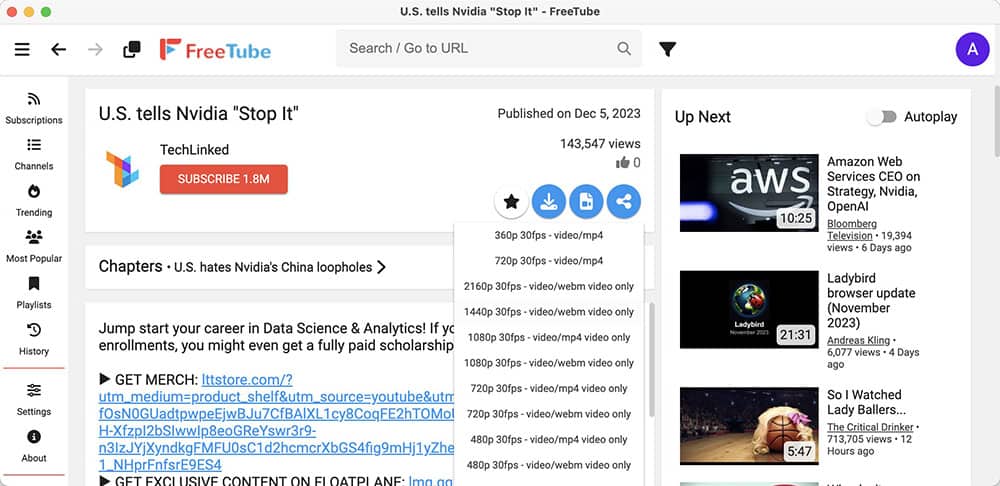
- Check format options: Good download software will present you with multiple format and resolution options after you paste the URL. Take a moment to review these before starting the download.
- Use a reliable connection: Large files — especially at 4K or 8K — benefit from a stable wired or strong Wi-Fi connection. Downloads interrupted midway can result in corrupted files.
- Keep your software updated: Video platforms frequently update their systems, which can break compatibility with older download tools. Keeping your software current reduces errors significantly.
- Troubleshoot with patience: If a download fails, try refreshing the page, copying the URL again, or switching to a different resolution option. Many failures are caused by temporary server-side issues rather than a problem with your tool.
Recommended Video Download Software
Several well-regarded tools exist for downloading videos across multiple platforms. When evaluating options, look for software that offers multi-resolution support, batch downloading, built-in format conversion, and regular updates to maintain site compatibility. Browser extensions can be convenient for occasional downloads, while dedicated desktop applications tend to offer more control, better speed, and support for higher resolutions like 4K and 8K.
YouTube Playlist Free Downloads: A Step-by-Step Overview
One of the most requested features in any video downloader is the ability to handle entire YouTube playlists in one go. Rather than downloading individual videos one at a time, playlist downloading lets you queue up dozens — or even hundreds — of videos and walk away while the software does the work.
How to Download a YouTube Playlist
- Step 1 — Find your playlist: Navigate to the YouTube playlist you want to download. Click on the playlist title to open its dedicated page, then copy the URL from your browser’s address bar. It will contain “playlist?list=” followed by a unique identifier.
- Step 2 — Open your download tool: Launch your chosen video download application and look for a batch download or playlist option. Most reputable tools include this feature prominently.
- Step 3 — Paste the playlist URL: Paste the copied URL into the download field. The software will analyze the playlist and display a list of all the videos it contains.
- Step 4 — Choose your settings: Select your preferred resolution (480P, 720P, 1080P, 4K, or 8K if available) and output format. MP4 is the most universally compatible choice for most devices.
- Step 5 — Start the download: Confirm your selections and begin the download. The tool will work through the playlist sequentially or, in some cases, download multiple videos simultaneously to save time.
- Step 6 — Enjoy offline: Once complete, your playlist videos are saved locally and available to watch anytime, anywhere — no internet connection required.
Are There Limitations on YouTube Playlist Downloads?
YouTube playlists can technically contain thousands of videos, though in practice most are far smaller. Some download tools impose their own limits on batch jobs — particularly free versions — so it’s worth checking the documentation for whichever software you use. Additionally, private or members-only playlists may not be accessible to third-party tools. Public playlists, however, are generally straightforward to download.
Legal Considerations: Staying on the Right Side of Copyright
This is an important topic that deserves a direct answer. Downloading videos for personal offline use occupies a legal grey area in many countries. Most video platforms — including YouTube — include clauses in their terms of service that restrict unauthorized downloading. Copyright law adds another layer, since the content itself may be owned by creators or studios who have not granted permission for offline copying.
The safest and clearest legal use cases for video downloading tools include:
- Downloading your own content that you have uploaded or created.
- Downloading content that is explicitly licensed under Creative Commons or another open license that permits redistribution or offline use.
- Using platform-native download features — such as YouTube Premium’s offline viewing — which are sanctioned by the platform and rights holders.
Always respect the work of creators. If content is freely available to stream, consider whether downloading it for offline personal use is truly necessary, and avoid any form of redistribution of copyrighted material.
Device Compatibility for High-Resolution Playback
Downloading an 8K video is only half the equation — you also need a device capable of playing it back smoothly. Most modern high-end smartphones, computers with dedicated graphics cards, and 4K or 8K televisions can handle 4K playback with ease. True 8K playback requires more processing power and a compatible display. Before downloading large 8K files, verify that your media player and hardware support the codec used (HEVC/H.265 is common for high-resolution content) to avoid playback issues.
Making the Most of Your Video Library
Building a personal video library from 300+ sites gives you remarkable control over your media consumption. You’re no longer dependent on a platform’s availability, licensing deals, or your internet connection. Whether it’s a lecture series, a travel documentary, a cooking tutorial, or a carefully assembled YouTube playlist free downloads collection, your content is yours to access on your schedule.
With the right tools, a clear understanding of resolution options, and a sensible approach to legal and ethical considerations, downloading video content in 8K, 4K, 1080P, 720P, or 480P becomes a straightforward and genuinely rewarding part of your digital life.

Jordan Hayes
Jordan Hayes writes about SEO, technology and the internet for BusinessToMark. He covers search updates, website growth and online tools in plain language, so business owners and bloggers can act on the advice right away.